
Participant
November 27, 2023
Answered

Photo on NAS and work on 2 computer (Windows / Macbook)

  • November 27, 2023
  • 1 reply
  • 302 views

Hello !

I have a NAS where all my photos are stored.


My catalog is currently on an external SSD and I'd like to be able to switch from my PC (Windows) to my Macbook to edit and retrieve my photos from the NAS.


My problem is that it tells me that my NAS is disconnected and when I do a search I get an error message "Invalid Path".
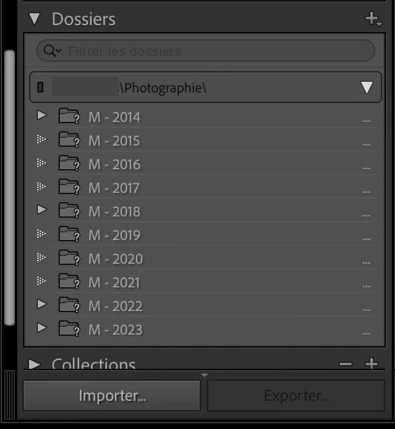
 

When I manually search my photo collection. It does find them, but it recreates a disk on top instead of using the existing one...


Inevitably, when I go back to the PC, the problem is reversed.


Does anyone have a solution for this ?


Thanks a lot !

This topic has been closed for replies.
Correct answer LEVEN_be

In fact, I've found a solution!
The problem was that the path from my NAS to the PC wasn't the right one.

I had chosen: Add a network location instead of Connect a network drive (with a letter).

However, I had to move all my photos via Lightroom so as not to lose my modifications.

Now, when I change computers, I just have to remap and it works without a hitch.

Thank you for your reply!

1 reply

ManiacJoe
Inspiring
November 28, 2023

Windows and Macs use two different naming conventions for disk drives and network drives. When you move the catalog from one to the other, you will need to remap the upper-most folder(s) to the correct name for that OS each time you do the move.

LEVEN_beAuthorCorrect answer
Participant
November 28, 2023

In fact, I've found a solution!
The problem was that the path from my NAS to the PC wasn't the right one.

I had chosen: Add a network location instead of Connect a network drive (with a letter).

However, I had to move all my photos via Lightroom so as not to lose my modifications.

Now, when I change computers, I just have to remap and it works without a hitch.

Thank you for your reply!