
Odrog
Participating Frequently
September 12, 2018
Question

Photos not showing on Import

  • September 12, 2018
  • 1 reply
  • 274 views

It was working. Lightroom Classic 7.5 release

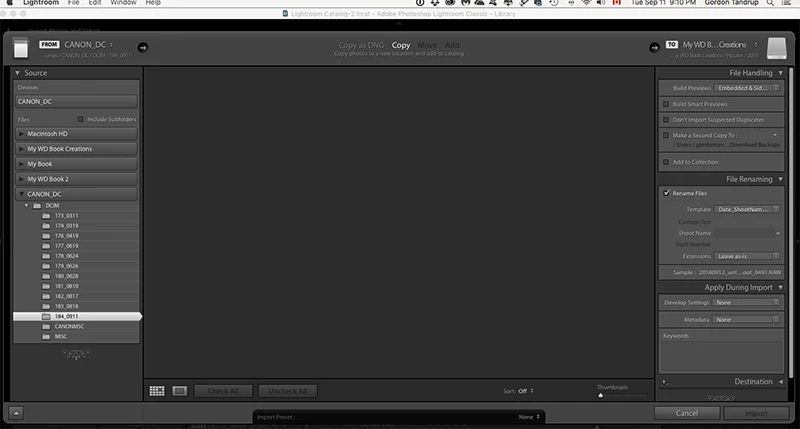
Card from camera plugged into computer (iMac). Can see photos via Finder, via Bridge, but no longer using Import - folders are shown with no number of photos and no photo previews, not even place holders
    This topic has been closed for replies.

    1 reply

    cmgap
    Community Expert
    Community Expert
    September 12, 2018

    Every card or just this card?

    Odrog
    OdrogAuthor
    Participating Frequently
    September 12, 2018

    It was every card. HOWEVER! I just got it working again - I hope - but not sure how. One thing, I hit the "Destination" tab and 2 photos showed up, but not all. So, decided may something out of sync with computer. Turned off and unplugged to reset SMC. So, will see if it continues to work.

    Thanks cmgap for such a quick response!

    cmgap
    Community Expert
    Community Expert
    September 12, 2018

    Excellent - glad to hear it. Rebooting is a go-to when Lightroom (or other app) is behaving.