
Pink lines using LR Denoise with some Fuji X100-F files
I’m getting pink lines on the right and bottom edges with files from my Fuji X100-F, but not from my Canon 6D Mark II. Some files get it, and some don’t. But it appears it’s something with the files, because repeated attempts give the same result for a given file: it has the lines or it doesn’t.
This happens when accessing CRW via both Photoshop and Lightroom. With Lightroom's graphics processor on and off.
The lines show in darker areas, and disappear completely when the image is lighter than around 50 luminance.
Photoshop, Lightroom and Camera Raw are the latest versions as of this morning.
I’m using an M1 MacBook Air with 16GB RAM.
This is the lower left corner.
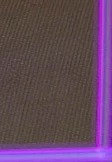

Here's a link to a DNG that has pink lines after Denoise (created from the Fuji .raf file on Lightroom import. I no longer have the .raf):
https://drive.google.com/file/d/1HEkOEsEfm19i7TAa04i8CePWwkcprAIp/view?usp=share_link
This Fuji X100-F file doesn’t get pink lines after Denoise:
https://drive.google.com/file/d/1zg-JSwoyh0gJSdh0Dm1-VsYwSQNlFtTN/view?usp=share_link
Here's the info from the Lightroom System info...
Lightroom Classic version: 12.4 [ 202306052221-b70c0975 ]
License: Creative Cloud
Language setting: en-US
Operating system: Mac OS 13
Version: 13.4.1 [22F82]
Application architecture: arm64
Logical processor count: 8
Processor speed: NA
SqLite Version: 3.36.0
Built-in memory: 16,384.0 MB
Real memory available to Lightroom: 16,384.0 MB
Real memory used by Lightroom: 633.6 MB (3.8%)
Virtual memory used by Lightroom: 422,806.9 MB
Memory cache size: 483.9MB
Internal Camera Raw version: 15.4 [ 1508 ]
Maximum thread count used by Camera Raw: 5
Camera Raw SIMD optimization: SSE2
Camera Raw virtual memory: 1275MB / 8191MB (15%)
Camera Raw real memory: 1330MB / 16384MB (8%)
Standard Preview Size: 1440 pixels
Displays: 1) 5120x2880
Graphics Processor Info:
Metal: Apple M1
Init State: GPU for Export supported by default
User Preference: Auto
Application folder: /Applications/Adobe Lightroom Classic
Library Path: /Users/rcb/Documents/Photo/Lightroom/Lightroom Catalog/Lightroom Catalog-v12.lrcat
Settings Folder: /Users/rcb/Library/Application Support/Adobe/Lightroom
Installed Plugins:
1) HDR Efex Pro 2
2) jf Bag-o-Goodies
3) LR/Transporter
4) Plugin Parameters
5) Shuffles
Config.lua flags: None
 AdChoices