
Rob_Cullen
Community Expert
Community Expert
June 1, 2025
Question

Please help me understand Edit-In options

  • June 1, 2025
  • 2 replies
  • 268 views

Why do I see the second appearance of Photoshop in the Edit-in menu?

 

I realize they work differently-

[Edit in Adobe Photoshop 2025...]  opens a raw file direclty in Ps, and a [SAVE] automatically brings the file back to the LrC catalog.

[Edit in Photoshop exe...]  first gives me the dialog to-
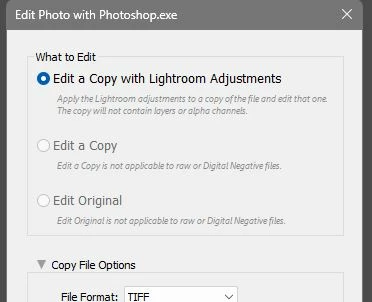
 

And  [SAVE] in Ps gives me the [Save As] dialog asking for destination and filename, and does not add the new file to LrC. (A folder synchronize is required).


My question was prompted by another user that had "Topaz" in the second (default?) choice.

I have not added Ps as an Additional External Editor.


2 replies

Legend
June 2, 2025

@Rob_Cullen 


I reproduced what you had: added Photoshop.exe as an Additional External Editor.


As you had Ps as an external editor at some stage and seemed to have removed it, the Application must have been still set to Photoshop.exe. I Removed my Photoshop.exe Preset and observe the same as you did: Preset: Custom; Application: Photoshop.exe.


Clicking the Clear button removes the Application. Now I have the same as you have.


Select another Preset (I only have one, Topaz Photo AI) and it becomes the Application. My Edit In... is now


Topaz Photo AI appears twice in the menu. If I put Photoshop back as an additional editor as save it as a new preset, then I get:


Not good, because two applications are now set to the short cut Ctrl+Alt+X.


Since LrC doesn't know if an additional editor can handle a lightroom edits, even if set to Photoshop, a copy is made with edits applied in the format specified. The very top Edit in Adobe Photoshop doesn't need to do this, so a copy isn't made until saved in Ps.


Edit: If the Photoshop.exe is removed from the Additional External Editor list and something else is added, keeping the Topaz Photo AI, then the duplicated keyboard shortcuts disappear.

Legend
June 2, 2025

@Rob_Cullen 


Please provide a screen shot of your Preferences dialog showing the External Editing tab with the Preset dropdown list open under the Additional External Editor section.


Rob_Cullen
Community Expert
Community Expert
June 2, 2025

Hi @drtonyb  

Beginning to understand, maybe!

I used to have an Additional preset (Open in Photoshop as JPG) but had deleted that. 

My screen-shot indicates no Additional Ps preset-

However I still see <Photoshop.exe> on the Application line.


UPDATE:  I clicked the [Clear] button and the [Photoshop.exe]  has gone and now says <not specified> in the Preferences


I tried the NIK Silver Efex preset for an image and still see <not specified>  in the Preferences dialog, so still not certain what placed <Photoshop.exe> in that secondary line.  I originally thought it indicated the preset for the 'Last Used' Preset

Now this is what I see when I [Right-click] a photo to Edit-in-  so 'Last Used' is not the case.

Not concerned- just learning the intricacies of LrC.

Thanks for reply.


Regards. My System: Windows-11, Lightroom-Classic 15.1.1, Photoshop 27.3.1, ACR 18.1.1, Lightroom 9.0, Lr-iOS 10.4.0, Bridge 16.0.2 .