Participant
August 16, 2020
Answered

Please help: using external hard drive but space being taken up on computer

  • August 16, 2020
  • 3 replies
  • 608 views

I am saving my photos as well as the lightroom classic catalog I'm working in on my external hard drive. However, when I try to import my photos (a large number, large sizes) into my lightroom catalog, I am told I don't have enough space after a while. I have a mac. When I look at the storage info for my computer, it looks like photos are somehow taking up space on my mac drive. I don't know why this is happening. Please help. I thought I could use an external hard drive to edit lots of large photos in lightroom. What am I doing wrong?
This topic has been closed for replies.
Correct answer Just Shoot Me

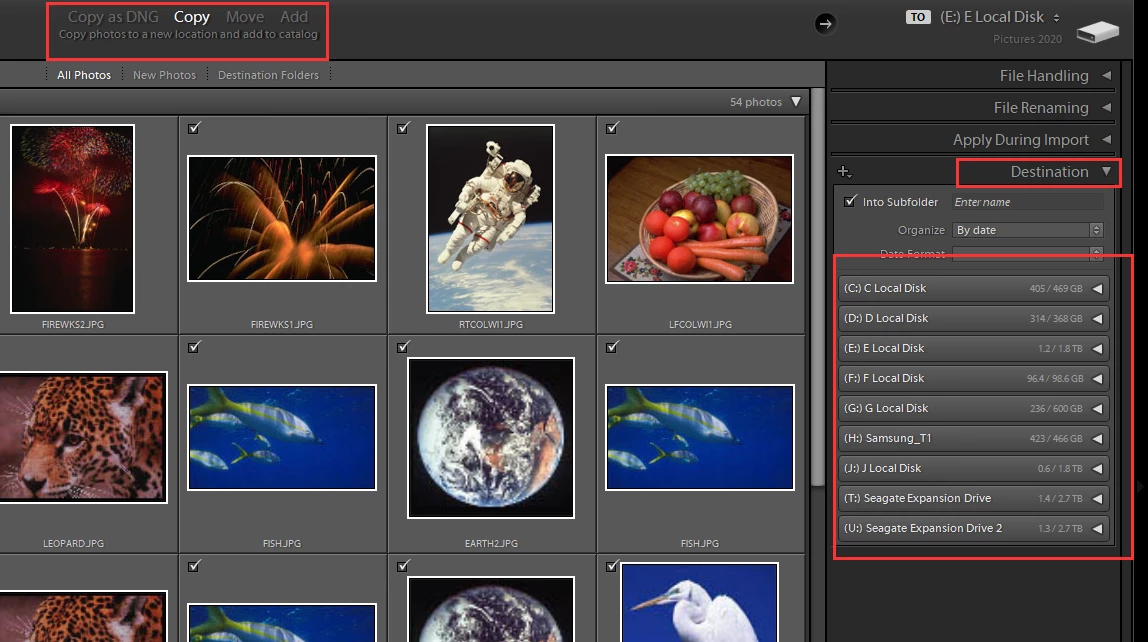
Then you have not selected the correct options and or the correct Destination for the imported files to be copied to. All of that is in the import dialog window and has to be reviewed, changes made/selected, prior to ckicking the Import button in the import window.


3 replies

Participant
August 16, 2020

Thank you!!! 

Just Shoot Me
Just Shoot MeCorrect answer
Legend
August 16, 2020

Then you have not selected the correct options and or the correct Destination for the imported files to be copied to. All of that is in the import dialog window and has to be reviewed, changes made/selected, prior to ckicking the Import button in the import window.


Rob_Cullen
Community Expert
Community Expert
August 16, 2020

Yes you can use external storage for both Catalog and the camera files.

You just need to set [External Drive] as the "Destination" for the imported files in the Destination Panel of the Import dialog!

Then the files imported are copied from the camera/card  directly to the External Drive nominated folders.


And -are you sure you are opening a Catalog on the External drive?  As the Previews cache which always accompanies a Catalog can grow to considerable size.


Regards. My System: Windows-11, Lightroom-Classic 15.3, Photoshop 27.5, ACR 18.3, Lightroom 9.3, Lr-iOS 10.4.0, Bridge 16.0.3 .