
Participant
July 4, 2022
Question

Preset amount slider

  • July 4, 2022
  • 5 replies
  • 6686 views

For some reason, the preset amount slider works only for some user presets. On the left the preset amount slider works perfectly fine, however on the right, the slider is greyed out and not usable. No clue what it could be. I am using LRC v 11.4.1 on Windows 11 Pro version 21H2.
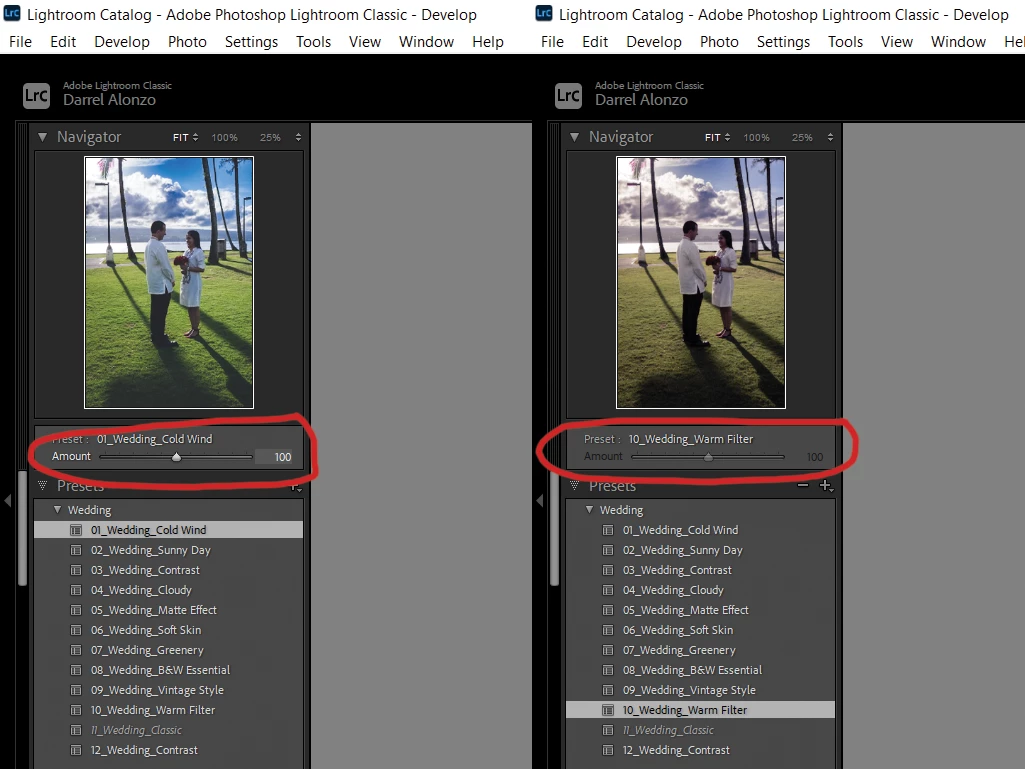


5 replies

Participant
December 24, 2024

Had the same problem with a preset. Fixed it by modifying the preset (simply by 'update with new settings') and unchecking "Lens Blur". You're Welcome.

TheDigitalDog
Inspiring
August 15, 2022

What is important is this: if the sliders move, it's a preset. If the sliders don't move, it's a profile. And they are separated in the profile browser, partially for this reason. If you are unable to select the Amount Slider, that indicates the selected settings do not support the Amount slider.

Author “Color Management for Photographers" & "Photoshop CC Color Management/pluralsight"
Participant
August 15, 2022

Discard all Transform and Crop settings, update preset and you good to go. Hope this help

igorduga
Participant
January 26, 2024

Thank you, you saved my life, no exaggerating

tmc60608719
Participant
July 14, 2022

There is a work around to this. Reset all settings of an image  (this is important!) and then set your "non adjustable" preset. Right click on the same preset and choose "Update with current settings". Your preset is not damaged in any way, just updated to the newest format. Which includes the Amount slider 🙂 .

JohanElzenga
Community Expert
Community Expert
July 15, 2022

@tmc60608719 wrote:

There is a work around to this. Reset all settings of an image  (this is important!) and then set your "non adjustable" preset. Right click on the same preset and choose "Update with current settings". Your preset is not damaged in any way, just updated to the newest format. Which includes the Amount slider 🙂 .


See the link I gave. It already describes this work around but also mentions that not every setting is adjustable. If you include a non-adjustable setting in your (updated) preset, then the preset itself won't support the Amount slider.


-- Johan W. Elzenga
tmc60608719
Participant
July 19, 2022

How do i choose between an adjusting and non adjusting setting ? What exactly makes it adjustable or not ?

JohanElzenga
Community Expert
Community Expert
July 4, 2022
-- Johan W. Elzenga