Heirloom Bob
Inspiring
December 13, 2018
Question

Preset Management

  • December 13, 2018
  • 1 reply
  • 498 views

I have the latest 8.1 release of LR on a Windows 10 PC. Since I did a new HD install and CC install, I had to re-import all my presets and that also is done.

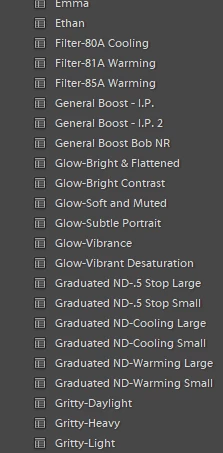
Now all my User Presets are listed in alphabetical order which looks nice but it's not practical to scroll up and down the presets to find the one I need. Is there a way that I can group my frequently used presets into a preset folder so that when I open it, all my commonly used ones are right there? Furthermore, I want to group similar presets together into their own folder. In the case shown here, one folder for all the Glow presets and another for all the Graduated ND presets for example.
Bob

    This topic has been closed for replies.

    1 reply

    john beardsworth
    Community Expert
    Community Expert
    December 13, 2018

    Click the + at the top of the Presets folder and choose Manage Presets.

    Or right click a preset and choose Move.

    You can also right click and Add to Favorites

    JohanElzenga
    Community Expert
    Community Expert
    December 13, 2018

    If you have lots of presets, this new method may become very time consuming. I do not have personal experience with it, but this plugin (Fix Presets Lightroom Plugin ) restores the old situation where preset organisation can be done via folders.

    -- Johan W. Elzenga