
Participant
October 24, 2022
Question

Presets menu crushed

  • October 24, 2022
  • 2 replies
  • 118 views

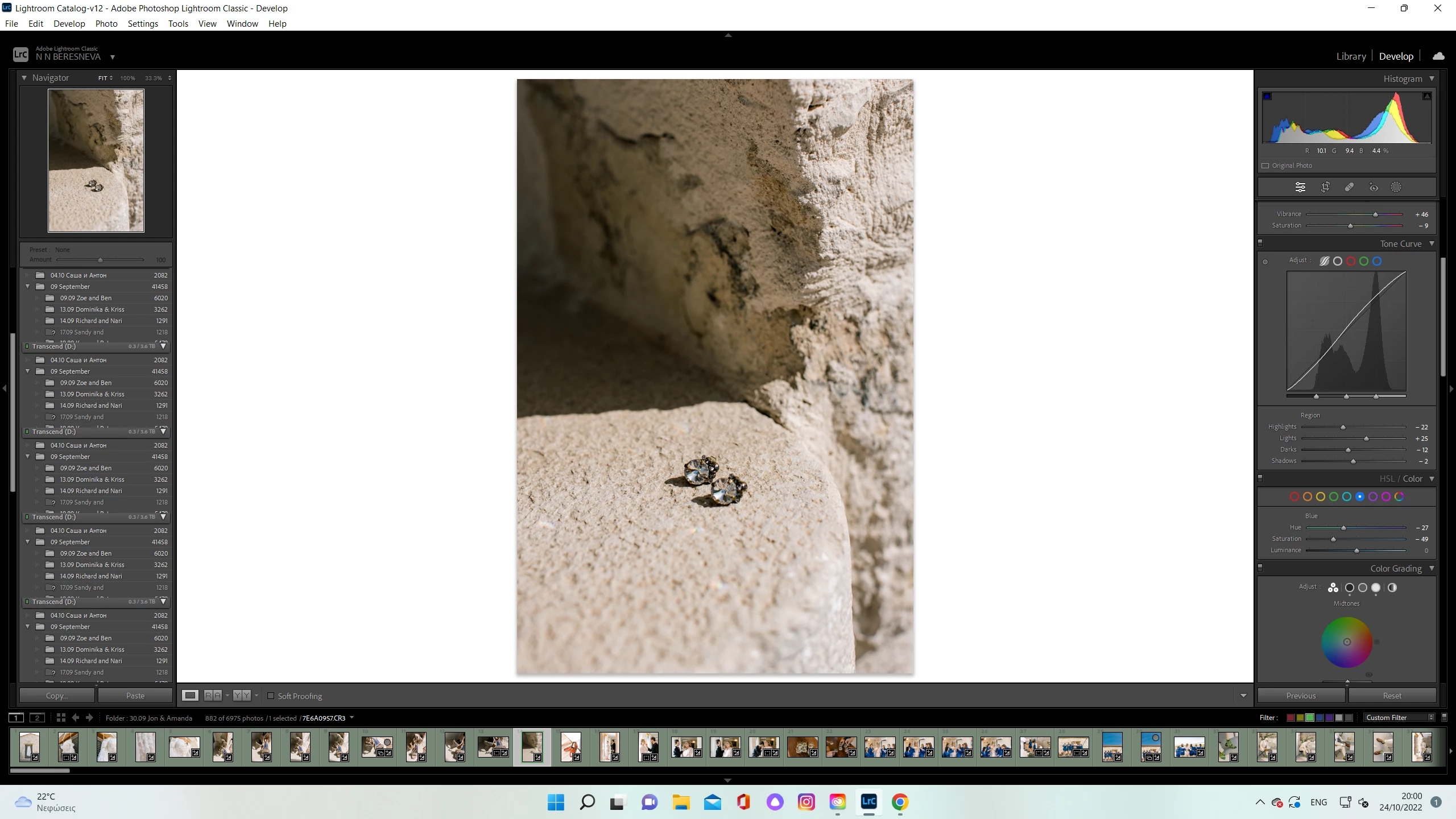
Hello everyone! Begging for help here. Installed a few new presets today and the whole Presets menu crushed. If I move my mouse to the menu where all presets are suppose to be, it applies, but I don`t see which exactly. Instead of presets it shows some folders from the library. Reinstalling previous version of Lightroom didn`t help. Tried to restart Lightroom, computer ( Windows 11) - no results, checked graphic card - all good. I really don`t know what else to do. 
This topic has been closed for replies.

2 replies

GoldingD
Legend
October 24, 2022

After you deal with the possible preferences file corruption (if you do). Revisit your Folders Panel major issue. What gives with that? Same parent over and over? Just begging for catalog corruption.


/edit/ I appear to be a bit dense today, yep, that folders panel should not be appearing in develop, defiantly a corrupt preference file.

JohanElzenga
Community Expert
Community Expert
October 24, 2022
quote

After you deal with the possible preferences file corruption (if you do). Revisit your Folders Panel major issue. What gives with that? Same parent over and over? Just begging for catalog corruption.


By @GoldingD


Not necessarily and probably not at all. This is also that preference corruption. The folder panel should not show in the Develop module at all, so I would ignore how it looks in that module.


-- Johan W. Elzenga
JohanElzenga
Community Expert
Community Expert
October 24, 2022

Try resetting the preferences. They survive a reinstallation of the app, so corrupted preferences could still be the culprit. 

https://www.lightroomqueen.com/how-do-i-reset-lightrooms-preferences/


-- Johan W. Elzenga
Participant
October 24, 2022

Thank you so much!!! It worked!