ShutR
Participant
June 25, 2019
Answered

Presets no longer shown after update

  • June 25, 2019
  • 2 replies
  • 597 views

I added some presets in the "Develop Presets" folder and they were working fine for months.

Yesterday I did install an updated release of a particular set of presets.

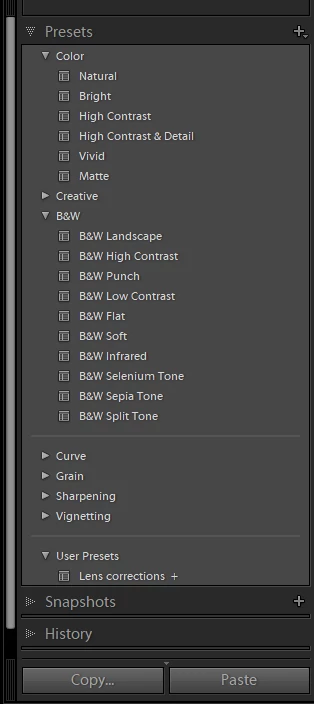
After that, these presets are no longer shown in de Develop module.

This is what I did:

  1. Closed Lightroom
  2. Deleted the folders with the particular set of presets
  3. Copied the folders of updated release
  4. Re-started Lightroom

All the presets are .xmp-files.

What do I need to do to get these presets shown in the Develop module again?

Thanks for the help.

    This topic has been closed for replies.
    Correct answer cmgap

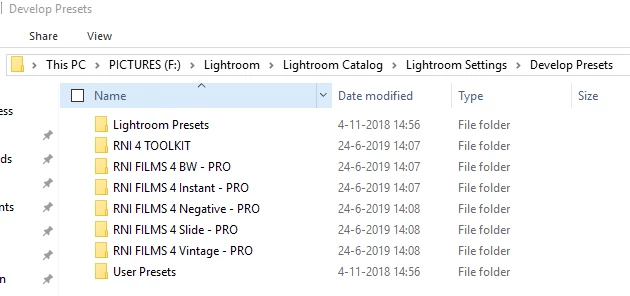
    Oke, below please find some screenshots, the visualize the situation/problem.

    I hope someone does have a solution for me.


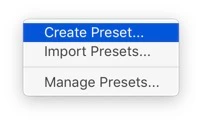
    Have you tried to add  them again? Tap the +  sign to the right side of the Presets pane > Import Presets and navigate to the folder above... If you tried this  and it didn't work - what message if any are you getting?

    2 replies

    cmgap
    Community Expert
    Community Expert
    June 25, 2019

    Why Step 2 Deleted the folders with the particular set of presets?

    Did you clear your trash? Are you on a mac or windows computer?

    ShutR
    ShutRAuthor
    Participant
    June 25, 2019

    The reason for deleting the folders was the update release with presets.

    How should I have done it?

    I did clear the trash, but do have an online backup.

    But even when I restore the files before I deleted them, they do not re-appear in the develop module.

    I am on a Windows computer.

    cmgap
    Community Expert
    Community Expert
    June 25, 2019

    I'm not on a Windows computer so  it will likely be more helpful if someone can chime in who is.

    However I'm not aware of any information that suggests deleting your presets is a step you need to take when updating. Lightroom's preferences > presets > Show Lightroom Presets Folder will open the folder where Lightroom  stores all of the presets. Checking Store Presets with this Catalog will save them in the Lightroom Settings folder in the Lightroom Classic folder. Adobe installs this folder in the Pictures directory by default.

    Preference file and other file locations | Lightroom Classic and Lightroom 6