
Participating Frequently
May 1, 2017
Answered

Presets panel is covering up History Panel & user presets no longer working

  • May 1, 2017
  • 2 replies
  • 1729 views

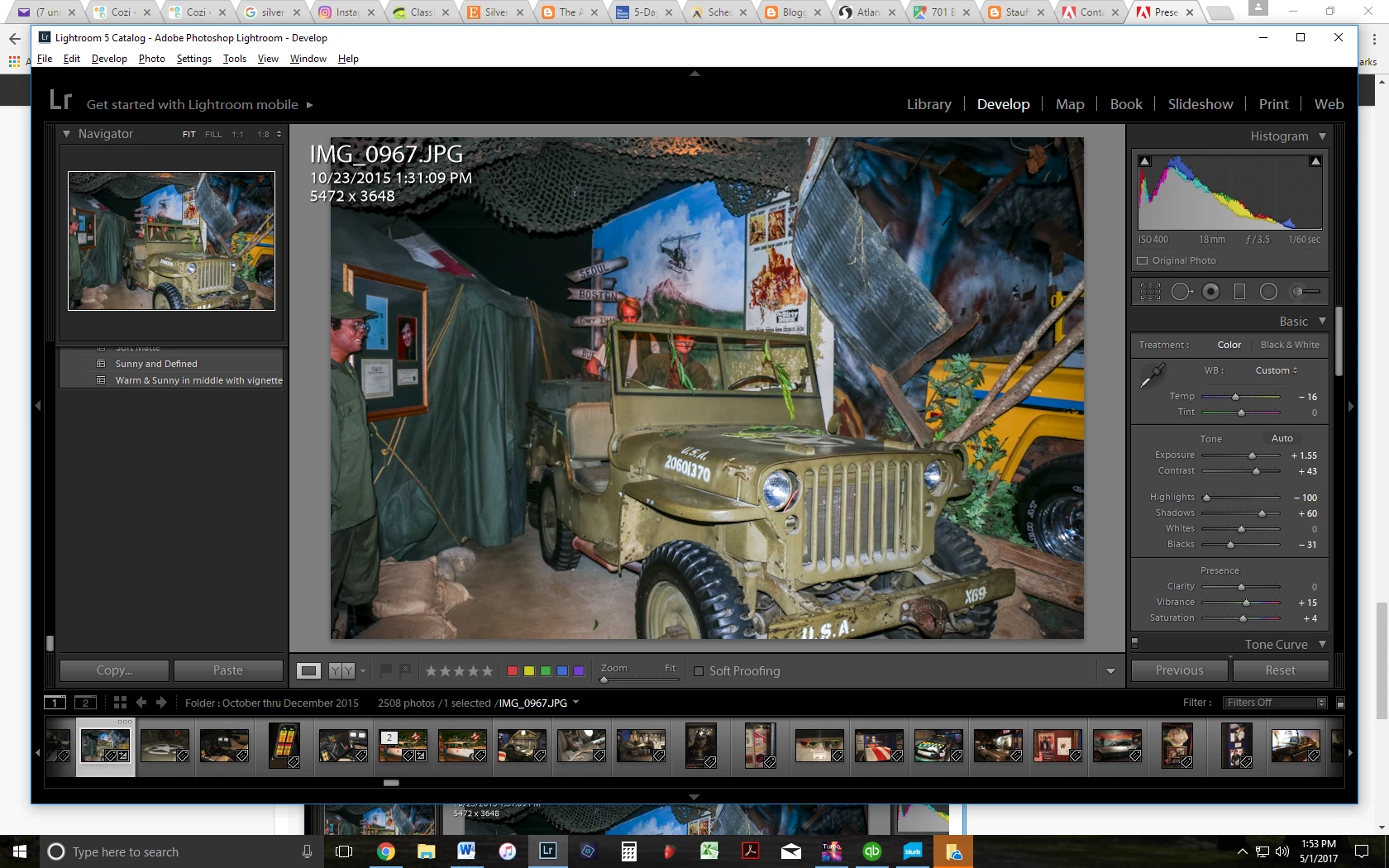
I have a PC and am using Lightroom 5.  I don't know what happened, but the last time I was using Lightroom, I noticed that my history panel had all of the sudden gone missing.  After some detective work, I found that the history panel was open, but for some reason, my presets panel is now covering up every other panel on the left hand side (history, snapshots & collections).  The history panel used to show up beneath my presets panel, but now my presets panel covers it up over the top (unless my history is really long, then sometimes I can see it poking out underneath my presets panel), and I can only view the history when I close the collapse the presets panel.  I can't find any way to drag it back down below when my presets panel is open or anything and haven't been able to find any solutions online. 

At the same time that that happened, all of the sudden none of the user presets that I have made are working.  This is a really weird combination of errors to me, but there you have it.  All of my purchased presets seem to be working fine, but the ones that I have custom made (or even ones that I purchased but re-named in order to re-arrange them) are not working anymore.  These are some of the presets that I use most often, so this is an issue for me.

I have tried closing and reopening Lightroom and re-booting my computer, as well as trying to drag panels, all to no avail.  Does anyone have any idea what might be causing these issues?
This topic has been closed for replies.
Correct answer Just Shoot Me

Unfortunately no.  There is still blank space below the final option in my preset panel, so there is enough room as seen here:

But there is just nothing there.  I tried what you suggested but it didn't resolve the issue.  Thank you for the suggestion, though!


Reboot your system and test.

Reset the LR Preference file.

2 replies

Sean McCormack
Community Expert
Community Expert
May 1, 2017

Alt click on a panel head to turn on Solo mode. You can also right click on a panel header and choose it. There's no way to reduce the size of what's in a panel though.

Solo mode allows one open panel at a time, so clicking on another panel opens that one and closes the previous one.

You only need to set it once, then clicks are normal clicks.

Sean McCormack. Author of 'Essential Development 3'. Magazine Writer. Former Official Fuji X-Photographer.
RimbigrawAuthor
Participating Frequently
May 1, 2017

I appreciate your ideas--thanks for taking time to help.  So yeah, it is basically acting like it is in solo mode even though I never put it into solo mode, and that is my problem.  I want to be able to keep whatever panels I want open and visible, one below the other like it is supposed to.  I am not trying to reduce the size of what is in each panel, rather I am trying to just get the other panel headings to show at the bottom of whatever panel I am currently looking at so that I can just scroll down and see them without having to collapse any of the panels.  I should be able to scroll down and see the other three headings (snapshots, history & collections) at the bottom of my presets panel, but it won't do that anymore.  I tried putting it into solo mode and then putting it back, but it still acts like it is in solo mode.

Also, any ideas on why my user presets are suddenly not working?  It's like something flipped a switch and all of the sudden the panels are messed up and none of my customized user presets will work.

Just Shoot Me
Legend
May 1, 2017

Reboot your computer and test.

Also what OS are you using?

Sean McCormack
Community Expert
Community Expert
May 1, 2017

Can you post a screenshot?

Is the scrollbar missing?

You can Command or Control click on a panel header to close all the panels.

Sean McCormack. Author of 'Essential Development 3'. Magazine Writer. Former Official Fuji X-Photographer.
RimbigrawAuthor
Participating Frequently
May 1, 2017

Here is a screen shot.  Yes, it has the slider on the left, and yes, I can collapse all of the tabs, but I would like to be able to view my history easily without having to collapse my presets panel every time (which hasn't been a problem until now because in the past, if I expanded a panel, it simply pushed down the rest of the panels so that I could still see them below, instead of covering them up so that I can't access them without collapsing other panels, like it is now.)

RimbigrawAuthor
Participating Frequently
May 1, 2017

Shown in this shot is the bottom of my presets panel, with no other panels showing below it.