Inspiring
September 26, 2020
Answered

preview in lightroom does not match color in develop

  • September 26, 2020
  • 3 replies
  • 1067 views

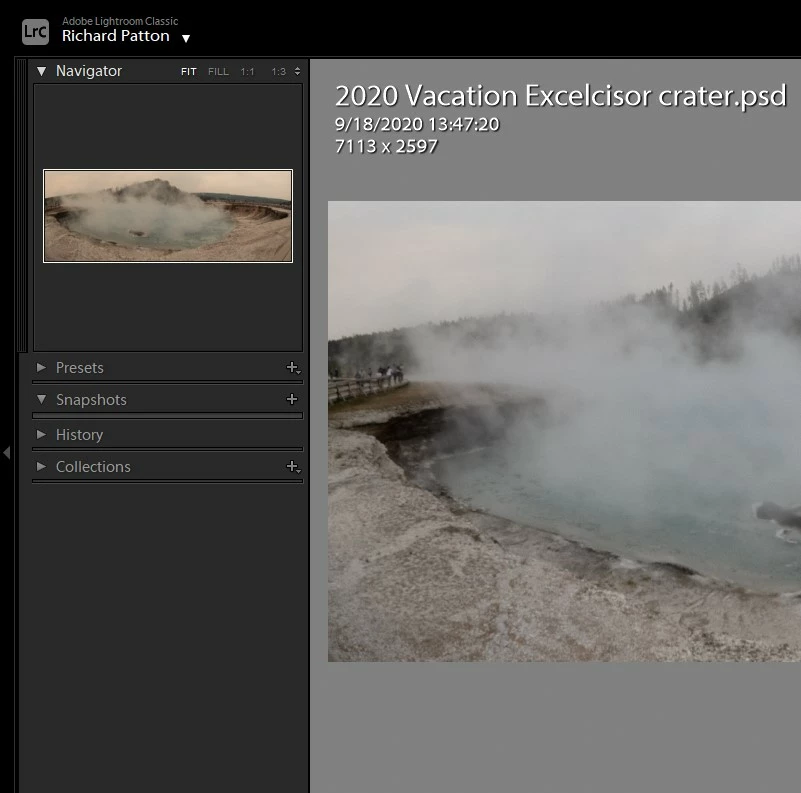
Previews in Lightroom Classic (and the image in Photoshop) are shifted to the red compared to what they look like in camera raw/edit mode and other apps. See attached clip:
This topic has been closed for replies.
Correct answer DdeGannes

Unfortunately, you need to test your monitor profile. I may be necessary to profile and calibrate your monitor display profile to display accurate and consistent colour across all applications. See the link below for help.

https://www.lightroomqueen.com/how-do-i-change-my-monitor-profile-to-check-whether-its-corrupted/ 


3 replies

Per Berntsen
Community Expert
Community Expert
September 26, 2020

It's quite rare to see differences in color between Library and Develop caused by the different color spaces.

I've seen it a couple of times, and in both cases it was reds being more saturated in Develop on an Eizo wide gamut monitor.

These monitors can reproduce reds outside the Adobe RGB gamut, and inside the Melissa (which is a variant of ProPhoto as I understand it) gamut. I was able to see the same thing on my own Eizo wide gamut monitor.

But 99% of the time, color management will make sure that Library and Develop display identically, and if there's a small difference, it will usually disappear when viewing at 1:1.


In this case, there's a difference between the Navigator and the image itself in Develop, so it has to be caused by something else, usually a defective monitor profile, which has been confirmed by the OP.


josephlavine
Community Expert
Community Expert
September 26, 2020

The Library module uses Adobe RGB color space and the Develop modules utilize Melissa RGB, which is a mix of ProPhoto RGB for color and an sRGB gamut curve, so there are at times, differences between the two modules.

-warmly/j

DdeGannes
Community Expert
DdeGannesCommunity ExpertCorrect answer
Community Expert
September 26, 2020

Unfortunately, you need to test your monitor profile. I may be necessary to profile and calibrate your monitor display profile to display accurate and consistent colour across all applications. See the link below for help.

https://www.lightroomqueen.com/how-do-i-change-my-monitor-profile-to-check-whether-its-corrupted/ 


Regards, Denis: iMac 27” mid-2015, macOS 11.7.10 Big Sur; 2TB SSD, 24 GB Ram, GPU 2 GB; LrC 12.5,; Lr 6.5, PS 24.7,; ACR 15.5,; (also Laptop Win 11, ver 24H2, LrC 15.3; PS 27.0; ) Camera Oly OM-D E-M1.
Inspiring
September 26, 2020

Thanks. That solved it. I had two different ICM files for the monitor(s) [two monitors same model] and neither of them worked properly. I cannot afford a monitor calibrator. It would be nice if they could be rented since they are a use once and you are done type of device.

DdeGannes
Community Expert
Community Expert
September 26, 2020

If you need the best then its recommended profiling your monitor monthly. 

Regards, Denis: iMac 27” mid-2015, macOS 11.7.10 Big Sur; 2TB SSD, 24 GB Ram, GPU 2 GB; LrC 12.5,; Lr 6.5, PS 24.7,; ACR 15.5,; (also Laptop Win 11, ver 24H2, LrC 15.3; PS 27.0; ) Camera Oly OM-D E-M1.