
Doenerbude
Participant
March 16, 2019
Question

Print as JPEG 10x15 cm

  • March 16, 2019
  • 3 replies
  • 6299 views

Dear all,

I just wanted to print six pictures 3,5 x 4,5 cm for passport on one 10x15 cm paper.

As I do not own a printer I want to print as JPEG and go to a local store to print it at the machine.

Unfortunately Lightromm CC Classic (latest Update) does not accept 10 x 15 cm as individual file size. Minimum is 10,16 cm:
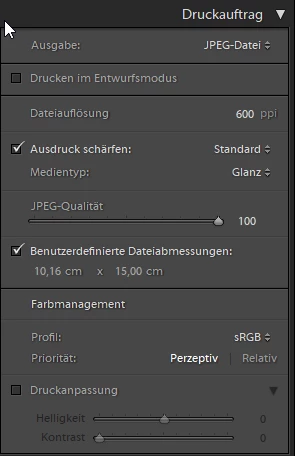
In consquence the machine at to local store will crop or size the image and due to this all my 3,5 x 4,5 cm pictures will not have exact size.

For me it seems that the user defined file size is limitted to 4 inches (4 x 2,54 cm = 10,16 cm). But of course it should be possible to print exactly 10 cm width.

Can somebody give me an advice if I do something wrong or if this is a failure in Lightroom?

Thank's in advance!

Mike

    This topic has been closed for replies.

    3 replies

    Geoff the kiwi
    Community Expert
    Community Expert
    March 17, 2019

    Try using inches 6x4 (15x10cm) and then change to mm you see the size is 154x102mm

    Community Expert
    March 16, 2019

    This option does not allow a "custom override" dimension below 10.16cm.

    But LR does not object when a "real" page setup is smaller than 10.16cm - and then you do not need to use the custom override. You can un-check this.

    Click Page Setup; and use your print driver settings to select (say) 10x15cm paper size. Your photos are set up within this area using real world sizes, the same as if you were printing on paper yourself. Then choose your JPG output options, including a resolution, for example 300ppi.

    In the example above a JPG will naturally be produced

    (10cm / 2.54 = 3.94, x 300 = ) 1181 pixels on the short edge,

    (15cm / 2.54 = 5.90, x 300 = )  1772 pixels on the long edge.

    As suitable, you can set a borderless mode in the print options and use the entire paper area - but it is necessary in this case, to be careful about whether the final print output will be enlarged  a few % (so, not at exact scale). This is common with borderless printing. So it is a good idea to speak with your printing service company and make sure that they will print your image at exact scale.

    DdeGannes
    Community Expert
    Community Expert
    March 16, 2019

    See the screen capture.

    Regards, Denis: iMac 27” mid-2015, macOS 11.7.10 Big Sur; 2TB SSD, 24 GB Ram, GPU 2 GB; LrC 12.5,; Lr 6.5, PS 24.7,; ACR 15.5,; (also Laptop Win 11, ver 24H2, LrC 15.0.1, PS 27.0; ) Camera Oly OM-D E-M1.
    Doenerbude
    Participant
    March 16, 2019

    My settings are:

    And result should be or is:

    I tried your settings but Lightroom still does not accept to use 10x15 cm as JPEG Export File dimensions:

    So I am still searching for a solution.

    Best regards

    Mike

    DdeGannes
    Community Expert
    Community Expert
    March 16, 2019

    My screen capture was to show where the option to set the size for a print is located. I have not input any specific options in the dialog.

    Hint, you may first have to apply a crop to the specific dimensions to the source file i.e. 45x35. LR is non destructive so the crop will not alter the original file then the image should fit in the print template.

    Regards, Denis: iMac 27” mid-2015, macOS 11.7.10 Big Sur; 2TB SSD, 24 GB Ram, GPU 2 GB; LrC 12.5,; Lr 6.5, PS 24.7,; ACR 15.5,; (also Laptop Win 11, ver 24H2, LrC 15.0.1, PS 27.0; ) Camera Oly OM-D E-M1.