Participating Frequently
November 10, 2022
Answered

Print Module Not allowing templates to multiple pages

  • November 10, 2022
  • 1 reply
  • 267 views

So I've always created some photomotage pages for a calendar, this year however, when I add 12 pages (months) and then apply a layout print template to the page, all the other pages disapear and I'm left with one. I've tried various alternative ways to do it and have been onto support for the past 2 hours and nothing. I know I'm not going mad, I've been doing it this way for years now but it's all of a sudden stopped working.


Anyone know what's wrong?
This topic has been closed for replies.
Correct answer Rob_Cullen

TBMK a pre-defined Custom Page 'Template' (selected from the Template Browser) will only produce one page.*

To use the same template for 12 pages you would need to design one page with photos and [Create a Saved Print]- repeat for each page. Then you can 'restore' each page to print from  Saved Print Collections (Page 1, Page 2, etc).


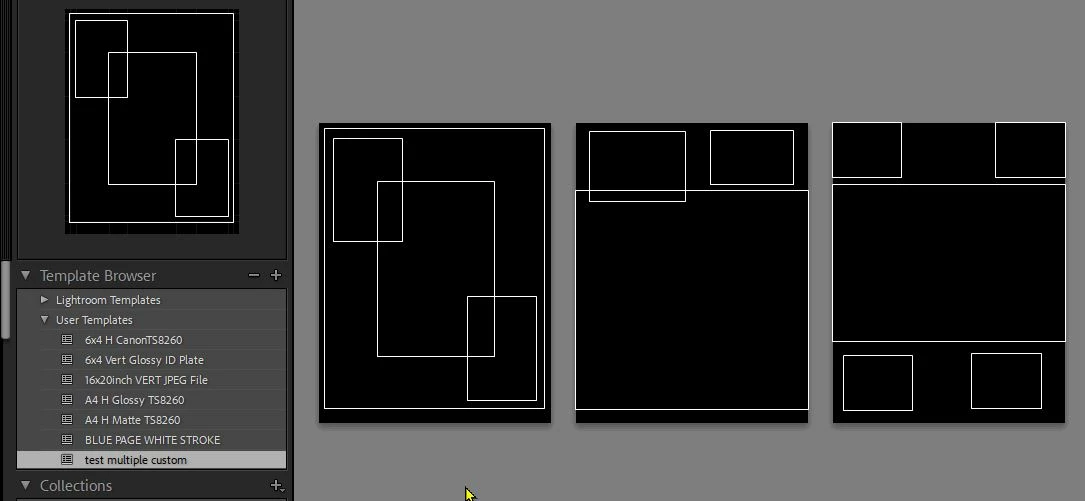
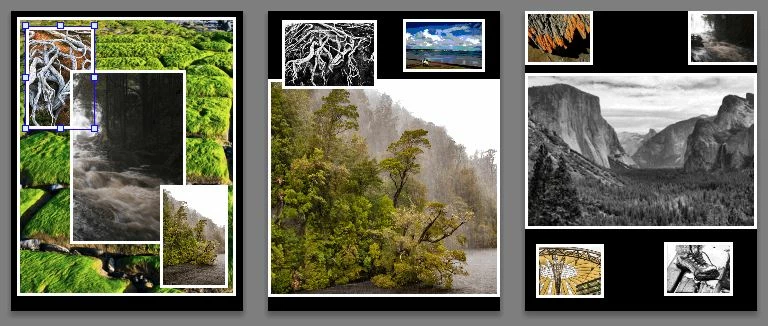
The only way to see multiple pages in the 'Custom Package' mode is to keep adding (large) photo cells that will create a new page when the cells over-fill the page size.


*NOTE: You CAN save a multiple page Custom Page Template that you have designed-


1 reply

Rob_Cullen
Community Expert
Rob_CullenCommunity ExpertCorrect answer
Community Expert
November 10, 2022

TBMK a pre-defined Custom Page 'Template' (selected from the Template Browser) will only produce one page.*

To use the same template for 12 pages you would need to design one page with photos and [Create a Saved Print]- repeat for each page. Then you can 'restore' each page to print from  Saved Print Collections (Page 1, Page 2, etc).


The only way to see multiple pages in the 'Custom Package' mode is to keep adding (large) photo cells that will create a new page when the cells over-fill the page size.


*NOTE: You CAN save a multiple page Custom Page Template that you have designed-


Regards. My System: Windows-11, Lightroom-Classic 15.1.1, Photoshop 27.3.1, ACR 18.1.1, Lightroom 9.0, Lr-iOS 10.4.0, Bridge 16.0.2 .
Participating Frequently
November 18, 2022

Hi Rob

Thank you for taking the time to help me, this has solved the issue and am now following your advice, again, thank you