
mikegf5.6
Participant
October 31, 2022
Answered

Print of file

  • October 31, 2022
  • 2 replies
  • 219 views

I go to PRINT in lightroom classic and it says "print to file", how do I get out of this so I can print a photo.

This topic has been closed for replies.
Correct answer Rob_Cullen

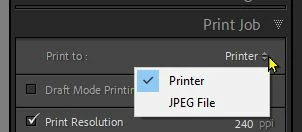
And check the 'Print Job' panel to see what is set in the drop-down [Print to:] menu.
2 replies

Rob_Cullen
Community Expert
Rob_CullenCommunity ExpertCorrect answer
Community Expert
October 31, 2022

And check the 'Print Job' panel to see what is set in the drop-down [Print to:] menu.

Regards. My System: Windows-11, Lightroom-Classic 15.1.1, Photoshop 27.3.1, ACR 18.1.1, Lightroom 9.0, Lr-iOS 10.4.0, Bridge 16.0.2 .
mikegf5.6
mikegf5.6Author
Participant
November 8, 2022

Thanks for the help

JohanElzenga
Community Expert
Community Expert
October 31, 2022

Select a printer instead of 'Print to file'. Print to file goes through the entire printing process, but the result is saved as a file (jpeg) rather than sent to the printer.


-- Johan W. Elzenga
mikegf5.6
mikegf5.6Author
Participant
November 1, 2022
thanks