Participant
November 23, 2024
Answered

Printing different folders of images

  • November 23, 2024
  • 1 reply
  • 209 views

I would like to know ifonce i have sent say 30 images to print, can i then select the next folder and set of images whilst the othere are still being sent to the printer?

Running MacOS Montery and using LrC.

This topic has been closed for replies.
Correct answer Conrad_C

Yes, it should be no problem at all. Both Lightroom Classic and macOS queue print jobs in the background, so that you can continue working in the foreground.


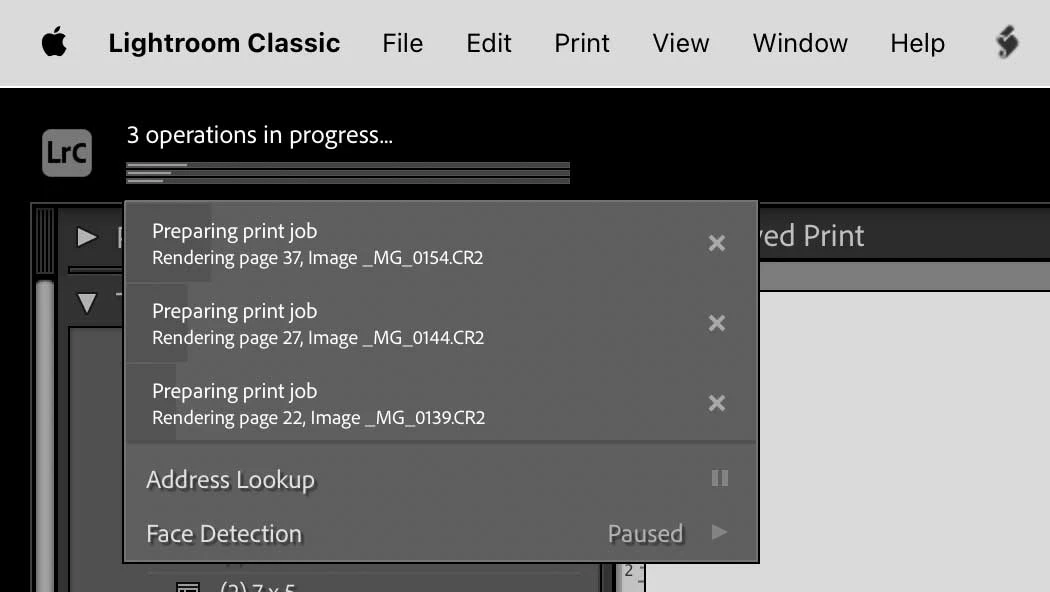
In Lightroom Classic, after you click Print, the job is queued for background processing by Lightroom Classic so that you can do something else without waiting. By clicking the identity plate to reveal the progress panel, you can monitor progress just as you can monitor background processes for importing, converting, exporting, and so on which also appear in that panel. In my example, I sent off a large print job, and then sent two more, so you see three print jobs in various stages of background rendering by Lightroom Classic.


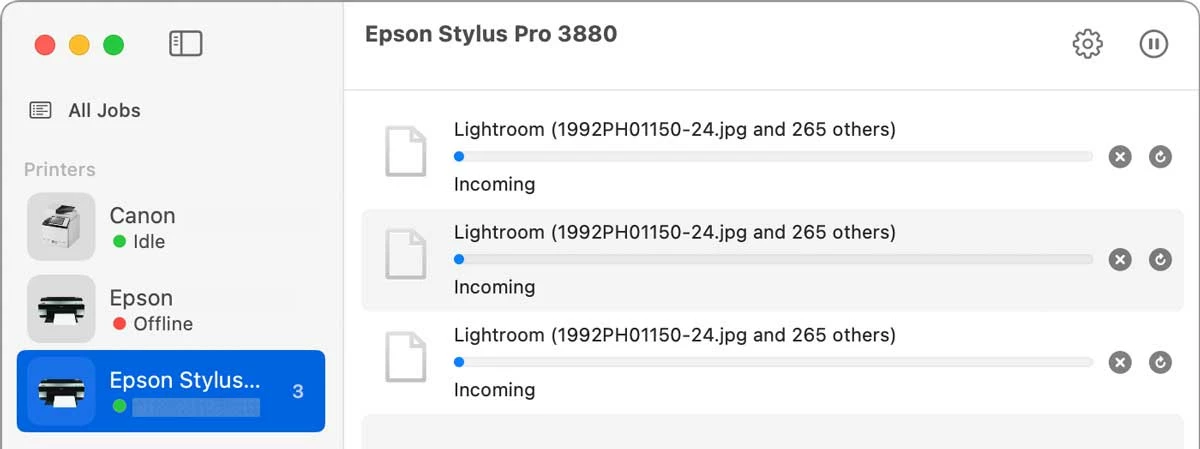
As each print job exits the application, the next stop is the macOS printing queue, which sequences print jobs received from any applications on your computer to any printers connected to your computer. Shown below are the three jobs received by macOS from Lightroom Classic, which are now lining up in macOS Print Center for the final trip to the printer.
 

For Microsoft Windows PCs, I think it works the same way. Background printing queues have been a standard feature on both macOS and Windows for many years.

1 reply

Conrad_C
Community Expert
Conrad_CCommunity ExpertCorrect answer
Community Expert
November 24, 2024

Yes, it should be no problem at all. Both Lightroom Classic and macOS queue print jobs in the background, so that you can continue working in the foreground.


In Lightroom Classic, after you click Print, the job is queued for background processing by Lightroom Classic so that you can do something else without waiting. By clicking the identity plate to reveal the progress panel, you can monitor progress just as you can monitor background processes for importing, converting, exporting, and so on which also appear in that panel. In my example, I sent off a large print job, and then sent two more, so you see three print jobs in various stages of background rendering by Lightroom Classic.


As each print job exits the application, the next stop is the macOS printing queue, which sequences print jobs received from any applications on your computer to any printers connected to your computer. Shown below are the three jobs received by macOS from Lightroom Classic, which are now lining up in macOS Print Center for the final trip to the printer.


For Microsoft Windows PCs, I think it works the same way. Background printing queues have been a standard feature on both macOS and Windows for many years.

Participant
December 1, 2024

Perfect! Thanks for the detailed answer.