
Printing in LRC to Epson printer requires that the "16-bit Output" box be *unchecked*
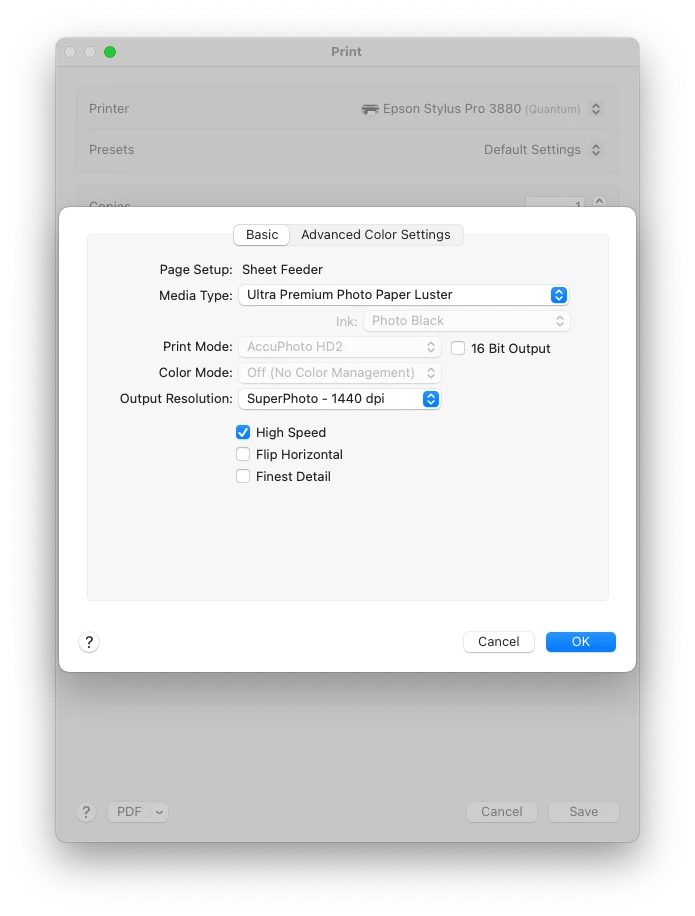
I've been frustrated for quite sometime (since switching to a new M1 MacBook Pro) that when I printed in LRC (to my old Epson 3880), the colors were dull, muted, and othersise messed up. After finally speaking with a human on Adobe's tech support line, I found that that this is a "known issue" (more on that, below): to prevent this from happening, you must uncheck the "16 Bit Output" box in Print Settings > Printer Settings, as shown here:
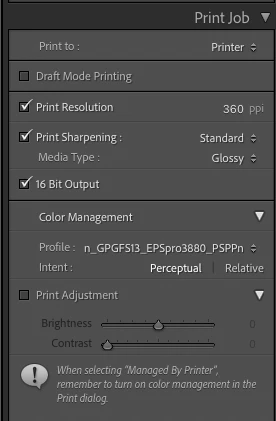
Note, it seems to be fine to leave the "16 Bit Output" box checked in LRC's Print Job settings, as shown here:
Anyway, back to my call with Adobe... The tech support guy said that this is a "known issue." I asked to please see this in Adobe's "known issue" listing, but he said it's not on any official bug/issue list. Rather, he evidently found it in a comment by @TheDigitalDog in an Adobe Community Forum post "Poor color printing in both Lightroom and Photoshop." (Great bug tracking, Adobe -- not!)
I created a test image in PS with a couple two-color gradients, to try to figure out the best settings. My findings:
- As @TheDigitalDog points out, don't check the "16 Bit Output" box in the Printer Settings dialog (the first screenshot, above). Otherwise you'll get a horrible print with completely messed up colors.
- For an 8-bit image, I get a little bit of banding across my gradients, regardles of whether the "16 Bit Output" box is checked in LRC's Print Job settings. (This makes perfect sense.)
- For a 16-bit image, I get somewhat smoother gradients, vs. the 8-bit image. (Again, this makes perfect sense.)
- However, at least as far as I can tell (with my gradient test image prints), there is no difference in the print output of a 16-bit image when the "16 Bit Output" box in LRC's Print Job setting is checked, vs. unchecked. Of course this doesn't prove that the Print Job settings' "16 Bit Output" checkbox doesn't do anything. But at least as far as I can tell, it dosen't seem to make any difference.
So, my "go-to" settings (for my 16-bit images) will be:
- Uncheck the "16 Bit Output" box in Printer Settings (the first screnshot). (Otherwise you'll get horrible colors!!)
- Check the "16 Bit Output" box in LRC's Print Job settings (the second screenshot). (Even though I couldn't see any difference in my printerd image when this is checked vs. unchecked, it doesn't seem to cause any issues, so I figure "why not just check it?")
I am curious if the Printer Settings dialog for the newer Epson (P900) still has the offending "16 Bit Output" check box? (That is, is the box still there? And if so, does checking it make for off-color issues?)
Hope this might be helpful to someone... Comments welcome.
 AdChoices