Printing : Weird line in printing tab
Hello everyone!
I've been printing for quite a while now straight from lightroom under the printing tab.
I'm printing with a canon pro 1000 on Hahnemuhle baryta FB A2 paper 99% of the time full borderless with no issues.
Haven't printed for a while a while , today a client of mine asked me to add a bottom margin to the print and add some quotes down there.
Suddenly LR added a weird white line on the right edge of my preview (under the printing tab) 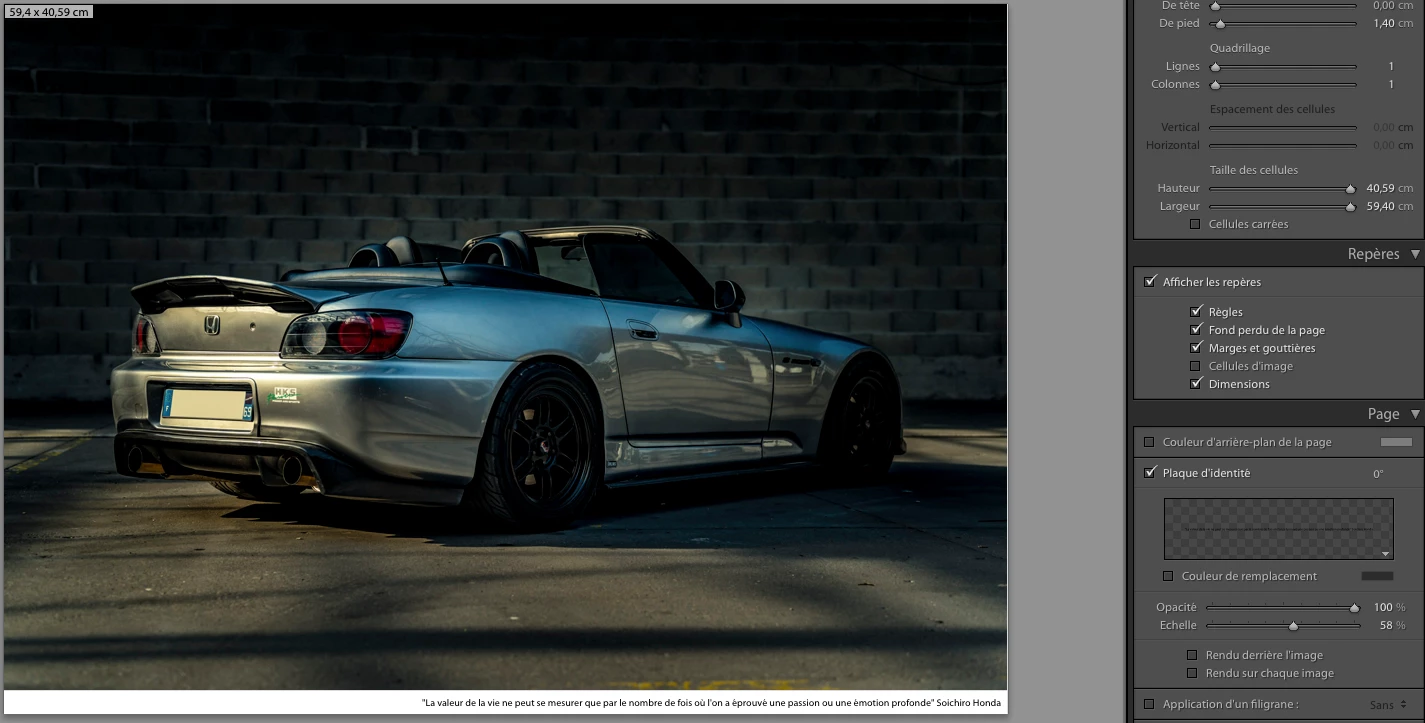
As you guys can see the photo doesn't fit the width of the paper anymore.
I'm all checked concerning the normal "borderless" settings , picked A2 borderless under the page setup menu and in the printing/printer menus. (since I want the rest of the image to occupy the full width and top part of my paper)
Furthermore , if I try to use a different page setup like A3 borderless for instance , this white line dissapears.
To double check that this isn't a paper setup failure I've created a custom paper and double checked that borders are set to 0mm on all sides => line still there . 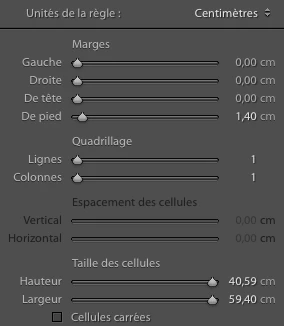
If I decide to remove this border and quote and decide to go full borderless , line still appear ...
Also tried to change the units and go from cm to mm , there the maths became good but the line still appears .
Before ruining another A2 sheet and ink , would like to hear if you guys might have any ideas 💡
Cheers ,
Baptiste
 AdChoices