Participant
January 2, 2025
Question

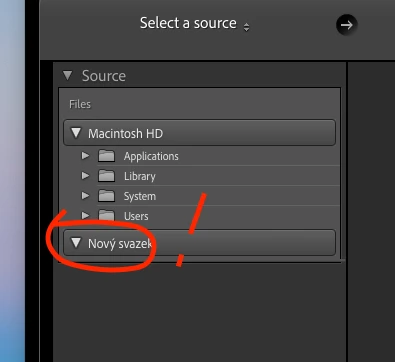
problem adobe lightroom classic not work externí disk

  • January 2, 2025
  • 2 replies
  • 84 views

Hello, am deaf from Czech Republic.Please me help problem. 
2 replies

JohanElzenga
Community Expert
Community Expert
January 2, 2025

Make sure Lightroom Classic has 'Full Disk Access' permissions. Apple changed the security requirements in MacOS Monterey and later. Go to MacOS 'System Settings - Security & Privacy' and add Lightroom Classic to "Full Disk Access" if it is not in there yet or not enabled. See Quick Tips: How to give Full Disk Access to Lightroom Classic on macOS


-- Johan W. Elzenga
AxelMatt
Community Expert
Community Expert
January 2, 2025

Unfortunately you don't have gave us any informations about your issue and your system. So all proposed solutions are a guesswork.


Please describe your issue more detialed. What do you have reid to do and what happened. Do you get an error mesages? If yes, please post the message word-by-word. Did it ever work? If yes, what has been changed on your system before the error occur?


Please provide a copy of your 'System Info'. This can be get from the LrC Help > System Info menu item. There's a copy button in the System Info dialog. Press this button and paste the info into your next forum post.


My System: Intel i7-8700K - 64GB RAM - NVidia Geforce RTX 3060 - Windows 11 Pro 25H2 -- LR-Classic 15 - Photoshop 27 - Nik Collection 8 - PureRAW 6 - Topaz Photo AI
