Participant
February 15, 2019
Answered

Problem importing and exclamation marks on images

  • February 15, 2019
  • 3 replies
  • 3819 views

Same issue for me in February 2019 I'm afraid. I cannot import any new images into LR Classic on my 2015 iMac, I have uninstalled and then re-installed however here are the following ongoing issues;

*I have the current software updates for both the Mac and LR.

1. Still cannot import

2. Almost all of the images are now marked with an exclamation point

Is there a quick way of recovering all of the images marked with an exclamation point, I would really like to avoid having to manually recover those images from their original destination.

Apologies for the lack of Adobe insight and knowledge.

Message was edited by: Moderator Branched from old discussion.
    This topic has been closed for replies.
    Correct answer Just Shoot Me

    rbrooks48  wrote

    1. Still cannot import

    2. Almost all of the images are now marked with an exclamation point

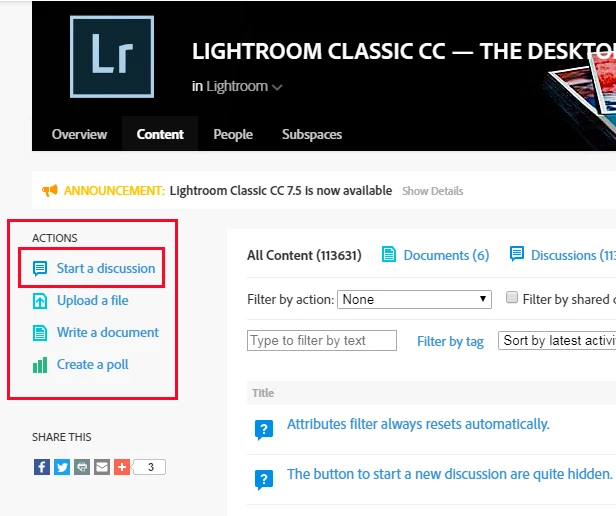
    First I suggest you start your own discussion. That option is found on the Contents page, upper left hand corner, or on the Overview page at the bottom

    Second, any time you see exclamation marks on images or question marks on folder or drive names or letters that mean LR can NOT locate the images that have been imported.

    You really need to start your own topic/ discussion and give as much details on what steps you are taking and it is best to include screen shots of the screens you are dealing with.

    3 replies

    Just Shoot Me
    Legend
    February 15, 2019

    I've branched your topic to a new discussion so there is no need for you to start a new one.

    rbrooks48Author
    Participant
    February 16, 2019

    Thank you for your assistance, all sorted now after synchronising the folder, appreciate your help.

    Just Shoot Me
    Just Shoot MeCorrect answer
    Legend
    February 15, 2019

    rbrooks48  wrote

    1. Still cannot import

    2. Almost all of the images are now marked with an exclamation point

    First I suggest you start your own discussion. That option is found on the Contents page, upper left hand corner, or on the Overview page at the bottom

    Second, any time you see exclamation marks on images or question marks on folder or drive names or letters that mean LR can NOT locate the images that have been imported.

    You really need to start your own topic/ discussion and give as much details on what steps you are taking and it is best to include screen shots of the screens you are dealing with.

    rbrooks48Author
    Participant
    February 15, 2019

    Update; I can now import using a card, however a manual import technique (see kentbydesign post earlier in the thread) to import some images from my desktop to the library (not a huge deal).

    I still desperately need to resolve the issue re: re-installed LR Classic with images now showing exclamation points, therefore potentially forcing me to manually recover them for their original destinations.

    kentdesign
    Community Expert
    Community Expert
    February 15, 2019

    Not sure if I understand your situation correctly, however, normally, if your images are showing with the exclamation points, it is simply a question of linking them back to where the photo files are stored.

    So, open your Lightroom catalog. Make sure the drive where the photo files themselves are stored, is connected to the computer.

    Then click t he exclamation point one thumbnail in the Library module. (I always write down the image name so that I can find it more quickly.) Lightroom will tell you the original image is missing and do you want to find it. Say yes, and then navigate to that one photo file on your drive with all the other photo files.

    When you select that one photo file, all the others in the same folder or location will relink also. Sometimes if you have multiple drives with different folders for your Lightroom Library, you may need to repeat the process. Just depends on your organization for your Photo Library ( the storage drive (s)) with all the original images.

    Hope this works. I have done this many times, as I keep growing my library and keep buying bigger drives to store my images. SO I often need to relink the photo files with the thumbnails in the Lightroom catalog in the Library module. It is not as complicated as it sounds!