

Problem moving folders and images within LR folders from Mac to external drive
Hi - just come across an issue and would love to sort this! Sorry it's so complicated to explain, but it's doing my head in ....
I was moving folders within Lightroom from Mac to external drive as I regularly do. Initially, drag and drop was not working within the 'Folders' space. Not sure what cased that issue, but I thought I would try and use 'Update Folder Location' to achieve the same result. Big mistake. In doing so, I have transfered all the images from a dated subfolder into a parent folder called '2023' without the subolder . LR tells me the files are saved in '2023' on the external drive, and I can happily edit these images as normal in LR, so I know these images are definitely inside my catalogue. But, when I create a new named subfolder in that 2023 external drive folder, and try to move the images into that new subfolder, I get a message saying:
All the files you selected are missing. No files can be moved.
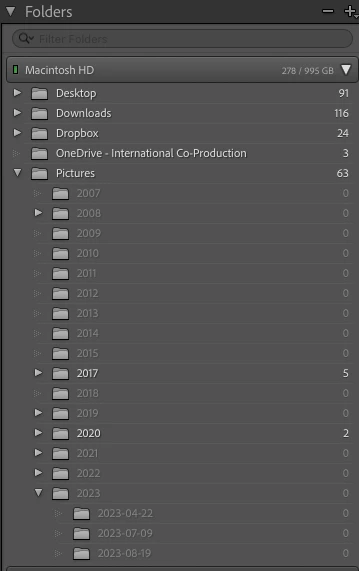
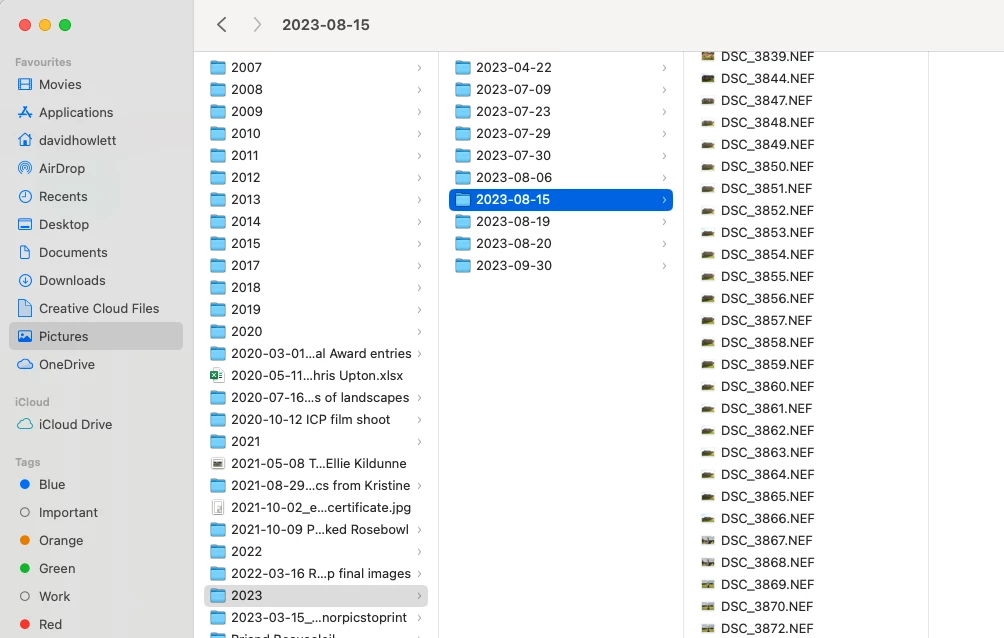
Even more puzzling - when I examine Mac Finder, I see all the 'missing' images still on my Mac inside Pictures/2023, where they previously resided safely in their original subolders. But when I look inside LR, they are not visible in the Pictures/2023 folder, nor are the subfolders.
So - where are my images, and how can I put them into my archive in a subfolder inside parent folder 2023?
Thanks so much for any help.
See screenshots:
 AdChoices