
JP Hess
Inspiring
October 28, 2021
Question

Problem transitioning from LrC to Photoshop

  • October 28, 2021
  • 6 replies
  • 713 views

I'm using an old HP Pavilion desktop, 8 GB RAM, motherboard will not accept anymore RAM. Using LrC 11 and latest Photoshop. Trying to edit a NEF file in Photoshop from LrC.


1. Choose option to edit in Photoshop.
2. Photoshop loads and displays as expected and shows work previously done in Photoshop.
3. Image chosen in LrC does not open in Photoshop.
4. Return to LrC by tapping in taskbar, leaving Photoshop open.
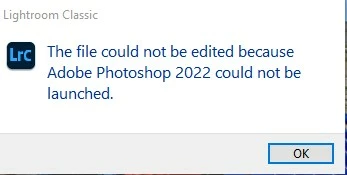
5. LrC indicates file was not opened because Photoshop could not be launched.
6. Return to Photoshop by tapping in taskbar, chosen NEF file has opened but converted to TIF.
7. Able to perform edits and save changes, close Photoshop, changed image displays in LrC.


I have repeated this sequence numerous times with the same results. I know, the computer is old and underpowered. Is this what I am to expect because of my computer specs?
 

This topic has been closed for replies.

6 replies

JP Hess
JP HessAuthor
Inspiring
November 3, 2021

Good thought. Just went through the process of resetting the Photoshop preferences. Still the same results. Thanks for the suggestion. I'll just have to use my alternative workflow if I ever have any images to process. Not really likely is this point, however.

JP Hess
JP HessAuthor
Inspiring
November 1, 2021

Been there, done that, everything is up to date. If I use Camera Raw and Photoshop, without Bridge, I can get a "normal" work flow. But if I try to integrate Lightroom or LrC in any way everything gets messed up. If I just want to use LrC, and don't want to rely on Photoshop for anything then everything is fine. So I guess that will work because I don't rely on Photoshop that often. I can export tiff images from Lightroom and then open them in Photoshop, but not FROM LrC. The workflow is gone. I tried a lot of different combinations. Even Bridge is messed up. I'm tired of it all, and not willing to wrestle with it anymore.

GoldingD
Legend
November 1, 2021

Time for the dreaded chat with Adobe?


JP Hess
JP HessAuthor
Inspiring
November 2, 2021

Not a chance of that, and I think you know why.

JP Hess
JP HessAuthor
Inspiring
November 1, 2021

And a final follow-up. I have done reinstallations and having problems with LrC and Lightroom and Photoshop and Bridge. The Camera Raw transfer process has become all screwed up to the point that none of this is enjoyable anymore. But I suppose that's okay because I'm just a hobbyist so none of my work is critical and the best solution is to just stop shooting. Nothing to edit means no more frustrations.

GoldingD
Legend
November 1, 2021

Double check that ACR install. Some have had problems. 


JP Hess
JP HessAuthor
Inspiring
October 29, 2021

Just a follow-up on my original post. I discovered that I had two instances of the camera raw plug-in so I deleted the older one. The problem still persists. I tried installing the Adobe cleanup app, but for some reason I can't figure out how to get it to install on my computer.


After the image doesn't open in Photoshop, if I close Photoshop and return to LrC and get the message that Photoshop could be opened, then TIF file is created and then a couple of seconds later Photoshop is activated again automatically and the TIF image is loaded into Photoshop. This is really weird.

Participant
October 28, 2021

I have exactly the same. My PC has 16 GB of RAM.
I also noticed that the latest Photoshop version was exceptionally slow when the file finally arrived there. It actually wasn't workable that way. I've spent hours and I've tried everything and also uninstalled and reinstalled Photoshop, but that didn't change anything.
In the end I uninstalled Photoshop again and installed the penultimate version. And then everything worked smoothly again as before!
My son's motto is always|: never immediately install a newly released program and I now think he is right.

MassC
Legend
October 28, 2021

Hey @JP Hess

Have you tried uninstalling/reinstalling Photoshop? If that didn't work please try removing ACR and reinstalling. You can do this by using the Creative Cloud cleaner tool. Please follow the steps mentioned here: https://helpx.adobe.com/in/creative-cloud/kb/cc-cleaner-tool-installation-problems.html


Let me know if this helps. 🙂 


Best, 

Careeeesa