
Participant
February 23, 2025
Question

Problem with A4 printing on Lightroom Classic

  • February 23, 2025
  • 2 replies
  • 155 views

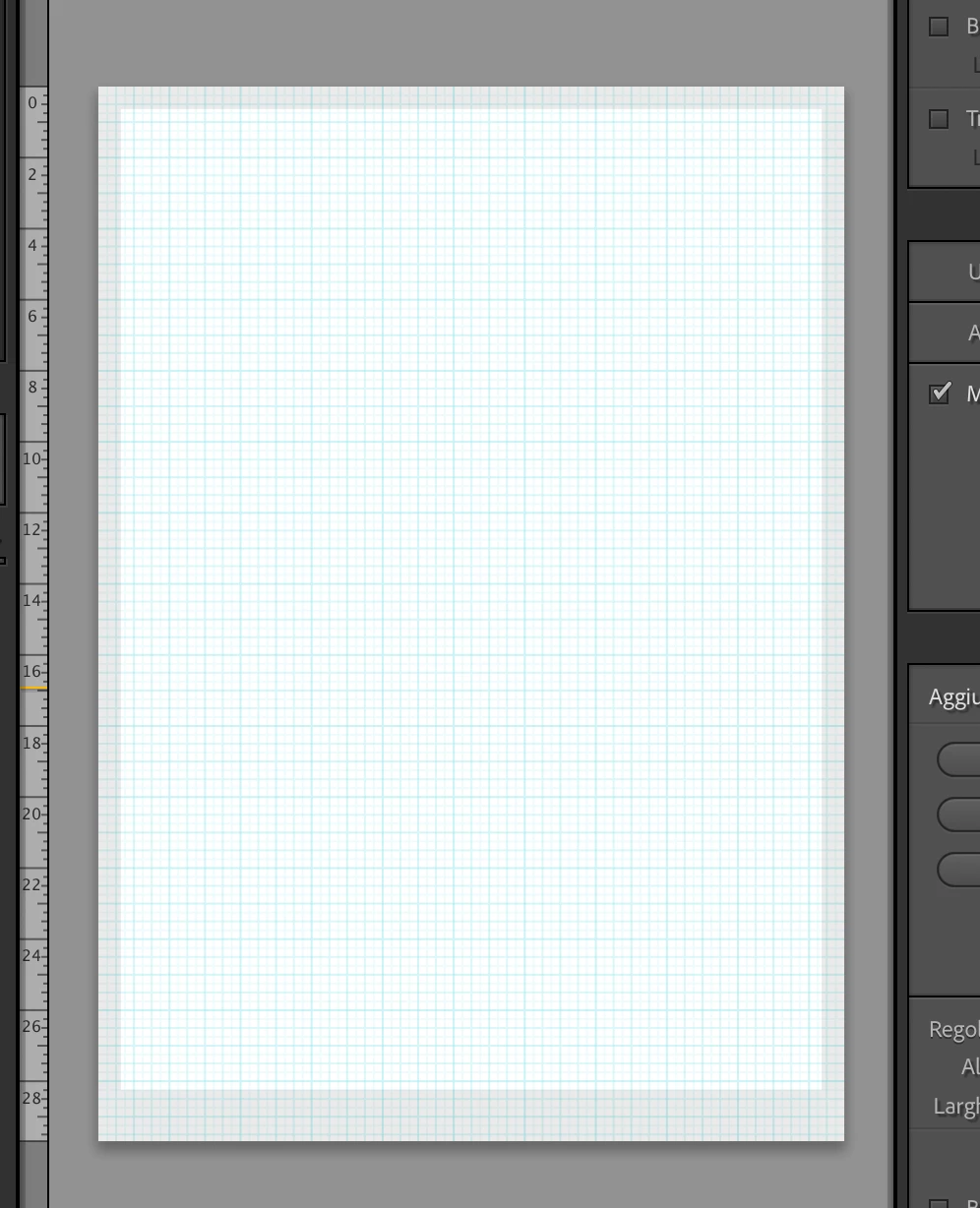
Good morning, I have a problem with printing from Lightroom Classic: suddenly, this morning the "print with borders" option disappeared and now I find myself with this page in A4 format, where it does not allow me to do anything: do you see the darker gray border? I can't change it in any way! I find myself with thicker borders than those I had previously and in addition the lower one is also wider than the others.
I tried every option but nothing, everything is stuck on those proportions.


Lightroom version 14.2

iMac whit Sequoia 15.0
 

2 replies

Rob_Cullen
Community Expert
Community Expert
February 23, 2025

The grey border is a property of the Printer that you have selected. It is the blank area that the printer will not print to.

If your printer allows it- if you set the printer to 'Borderless' in printer setup then the grey border guide will not appear.

I do not know where you see the "print with borders" option- I can only apply a Stroke to images on a Custom Page print layout.


Regards. My System: Windows-11, Lightroom-Classic 15.1.1, Photoshop 27.3.1, ACR 18.1.1, Lightroom 9.0, Lr-iOS 10.4.0, Bridge 16.0.2 .
Participant
February 23, 2025

The point is that I have not selected anything new compared to before and even if I wanted to select now, I no longer have the option I had before: that gray area with those proportions, has never appeared before and I don't know how to go back to the small borders (equal to each other) with which I printed before. 

Rob_Cullen
Community Expert
Community Expert
February 23, 2025

Can you set your printer to 'Borderless'? (Removes the grey area completely)

What printer do you have selected?    (I see a difference of lower grey border with  OKI and Canon printers)

This is the difference I see with my Canon printer- (Photo cell set at maximum)

I can however set CELL size to give me 'white' paper borders that are closer to equal on all sides-


Regards. My System: Windows-11, Lightroom-Classic 15.1.1, Photoshop 27.3.1, ACR 18.1.1, Lightroom 9.0, Lr-iOS 10.4.0, Bridge 16.0.2 .
Rob_Cullen
Community Expert
Community Expert
February 23, 2025

Deleted. (wrong answer)


Regards. My System: Windows-11, Lightroom-Classic 15.1.1, Photoshop 27.3.1, ACR 18.1.1, Lightroom 9.0, Lr-iOS 10.4.0, Bridge 16.0.2 .