marcop58474159
Participant
March 12, 2018
Answered

Problem with adjustment brush tool

  • March 12, 2018
  • 2 replies
  • 784 views

Hi there,

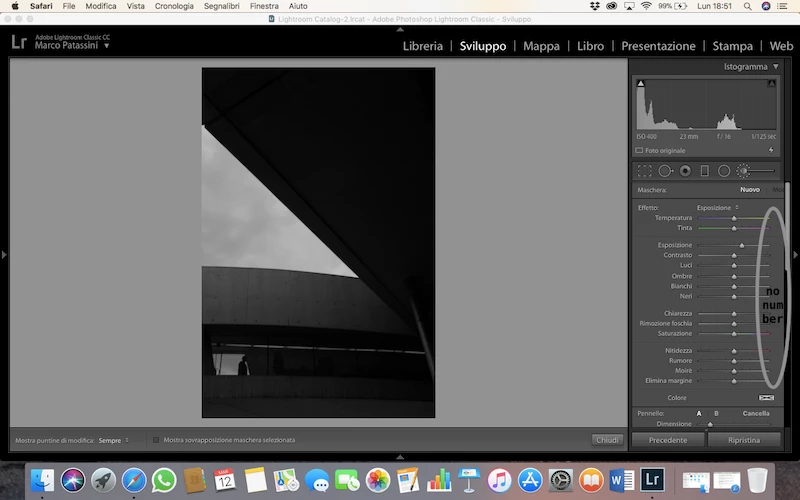
I have a problem with the adjustment brush tool. Since I update Lightroom Classic CC I can't see the number in the right (for example, -0+) as you can see in the image that I'd upload.

Can someone help me please? I tried to reset preferences and I tried to uninstall and re-install the program, but nothing changed...

thanks a lot.

Marco

This topic has been closed for replies.
Correct answer johnrellis

Please post a bug report in the official Adobe feedback forum: Lightroom Classic CC | Photoshop Family Customer Community . Be sure to include all the output from the menu command Help > System Info.  Adobe product developers and senior technical support read every post in that forum, but not here.

Meanwhile, some troubleshooting steps that might produce a usable workaround:

- Try disabling the GPU (or enabling it, if it's off) by checking/unchecking Preferences > Performance > Use Graphics Processor.

- Try running LR in another language via Preferences > General > Language (restart LR after changing it).  A long time ago there was a similar bug that only afflicted some languages.

- Update your Mac to the latest version of Macos (10.13.3) -- that's the only way to get the latest graphics drivers.  LR tends to trip over bugs in older graphics drivers.

2 replies

JohanElzenga
Community Expert
Community Expert
March 12, 2018

This is a bug in some localised versions. If you run Lightroom in English the problem is over. I believe a bug report was already posted at the feedback forums, but I'm not absolutely sure.

-- Johan W. Elzenga
johnrellis
johnrellisCorrect answer
Legend
March 12, 2018

Please post a bug report in the official Adobe feedback forum: Lightroom Classic CC | Photoshop Family Customer Community . Be sure to include all the output from the menu command Help > System Info.  Adobe product developers and senior technical support read every post in that forum, but not here.

Meanwhile, some troubleshooting steps that might produce a usable workaround:

- Try disabling the GPU (or enabling it, if it's off) by checking/unchecking Preferences > Performance > Use Graphics Processor.

- Try running LR in another language via Preferences > General > Language (restart LR after changing it).  A long time ago there was a similar bug that only afflicted some languages.

- Update your Mac to the latest version of Macos (10.13.3) -- that's the only way to get the latest graphics drivers.  LR tends to trip over bugs in older graphics drivers.