Answered
Problem with running Lightroom
Hello
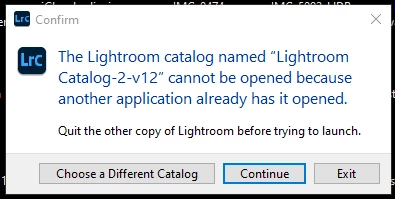
When I start LrC, I get a message like in the picture.
When I click continue nothing happens, still the same message.
I also don't know what other application might use this catalog.
Anyone got an idea?

Hello
When I start LrC, I get a message like in the picture.
When I click continue nothing happens, still the same message.
I also don't know what other application might use this catalog.
Anyone got an idea?
Using Windows Explorer (or Mac Finder on a Mac), navigate to the folder where your catalog file is stored. In there, you should see a file whose name ends with .LOCK (might be lower case). Delete the .LOCK file. DO NOT DELETE ANYTHING ELSE.
Already have an account? Login
Enter your E-mail address. We'll send you an e-mail with instructions to reset your password.
 AdChoices