
susanl7866380
Inspiring
January 14, 2023
Answered

Problem with the crop tool

  • January 14, 2023
  • 4 replies
  • 1481 views

LR v. 12.1

iMac 24" M1 chip running Ventura v. 13.1

I know there has been problems with the crop tool in the past but they don't seem to be quite the same problem.

I upload a photo, make a square crop, send photo to Topaz AI and it makes a square crop from the square crop I already made.  I initially thought this was a Topaz problem but I went on to investigate further.  After cropping the photo to 3648 x 3648, I check the demensions in LR library and the photo shows the original demensions.  However, if I send the original photo to PS without cropping and crop to a square, all is as it should be.  The interesting thing is, if I send the cropped photo from LR to PS and save it back to LR without doing anything, the cropped demensions are correct and work correctly in Topaz as well.  This problems also occurs with other crop demensions.  I have not reset preferences as yet (I seem to have to reset them everytime there is an update now and I am kind of tired of it.). Maybe this bug will get fixed soon if enough people have the same problem.
This topic has been closed for replies.
Correct answer Bob Somrak

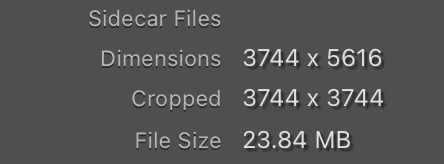
There are two different dimensions you can show in Library Exif,  Dimensions which is the dimensions of the uncropped photo and Cropped which are the cropped dimensions.


4 replies

DdeGannes
Community Expert
Community Expert
January 26, 2023

Good you got the issue resolved. If you look at the first image in three I included in my last post you will see the Dimensions and Crop in the recorded metadata when the original image is selected.

Regards, Denis: iMac 27” mid-2015, macOS 11.7.10 Big Sur; 2TB SSD, 24 GB Ram, GPU 2 GB; LrC 12.5,; Lr 6.5, PS 24.7,; ACR 15.5,; (also Laptop Win 11, ver 24H2, LrC 15.0.1, PS 27.0; ) Camera Oly OM-D E-M1.
susanl7866380
Inspiring
January 26, 2023

Thanks again Denis and Sean.  You were both great to help and it is much appreciated.

GoldingD
Legend
January 26, 2023

Perhaps you can present your workflow as follows, please correct my errors:


  • In LrC you select a photo, photo A1

inquiry, In LrC, photo A1 has dimension of ??

  • You crop photo A1 to a ratio of 1x1
  • You select to Edit In, photo A1, in Topaz AI

inquiry, is the photo A1, RAW or JPEG?

  • LrC does or does not inquire about method of copy if not RAW, then creates a copy, photo A2, and passes it along to Topaz AI

At this point, I am confused.

  • In Topaz AI, photo A2 has the same, as expected crop ratio of 1:1.
  • In Topaz you crop photo A2, this time based on dimensions, not ratio, to the dimensions of 3648x3648
  • You close the photo A2 in Topaz AI, returning it to LrC.
  • Looking at photo A2 in LrC, it is not at a crop ratio of 1:1?
  • Looking at photo A2 in LrC it does not have dimension (not ratio) of 3648x3648? But the same as photo A1?


Next, involving PS


  • In LrC, you do not crop photo A1
  • You select to edit photo A1 in PS

Inquiry, repeated, RAW or JPEG, will assume RAW

  • In PS you crop
  • In PS you select either save or close, PS saves the file, now photo A2, and returns you to LrC.
  • In LrC photo A2 is presented, selected. the crop, both ratio and dimension are as expected
  • In LrC, you send (edit in) photo A2 to Topaz A2, or you just open photo A2 in Topaz AI, the crop is correct, and behaves.

request, can you clarify how that photo is opened in Topaz AI


Having typed all the above in, one item is screaming at me, is the original photo RAW or JPEG? That alters if we are talking about one original photo and a resultant copy (A1 and A2) or just one photo (not RAW, and a user decision)

susanl7866380
Inspiring
January 26, 2023

Lets leave Topaz out of the discussion.  The only reason it was in the discussion was because that was when I first noticed the issue.  Here is my workflow:

1. Upload raw photos to LrC from camera.

2. Do basic edits including cropping if needed

3.  Check crop demenision in the library module and exif does not reflect the crop.  It shows the original demension of the photo.  It makes no differnce if the photo was cropped to a square, 16 x 9 or any other crop.  The exif shows the original demensions.  The photo itself does reflect the crop.  In other words, if cropped to a square, it looks like the square.

4.  Send cropped photo to PS, either do some editing or just send it back, it comes back as a TIFF file as usual and the cropped demensions are now showing up correctly.

5.  Send it to PS uncropped, crop it there and send it back, it shows the cropped demensions correctly.


All my external editors, PS, Topaz, etc. return RAW files as TIFFs.  This phenomenon occurs whether I use CR3 files (Canon) or iPhone DNGs.

Sean McCormack
Community Expert
Community Expert
January 26, 2023

In 3 are you looking at Dimension or Cropped? Dimensions will show the original size even if the image is cropped. When you render a file via editing, the Dimensions will reflect the new, updated size. 


Sean McCormack. Author of 'Essential Development 3'. Magazine Writer. Former Official Fuji X-Photographer.
DdeGannes
Community Expert
Community Expert
January 26, 2023

@susanl7866380, I am not sure if I can follow the procedures you are describing so the following is my workflow and experience when sending an image from LrC to Topaz DeNoise AI.

Have the original raw file in the Develop Module and apply "adjustments" including a crop. I say adjustments since LrC never "edits" the original file it stores the adjustments in the Catalog file. Next, I will select from the Menu bar Photo> Edit in Topaz DeNoise AI and there will be Pop up with the option Edit a copy with Lightroom Adjustments selected. Proceed with the process and LrC renders the raw image and the Topaz application will boot and proceed to apply the DeNoise AI process. When completed the tiff file will be saved in LrC alongside the original raw file. That tiff is a new edited image with your LrC adjustments included.

Is that what you also do?

Are you saying that your adjustments "edits" from LrC are not applied or displayed correctly?

 See some screen captures from my Library Module grid view when the edited image is returned to LrC.

The first image shows the original raw image with the Dimensions original and cropped.

The other two show the tiff with the new dimensions one stacked and one not stacked. The Metatadata panel shows the pixel size.


Regards, Denis: iMac 27” mid-2015, macOS 11.7.10 Big Sur; 2TB SSD, 24 GB Ram, GPU 2 GB; LrC 12.5,; Lr 6.5, PS 24.7,; ACR 15.5,; (also Laptop Win 11, ver 24H2, LrC 15.0.1, PS 27.0; ) Camera Oly OM-D E-M1.
susanl7866380
Inspiring
January 26, 2023

Thanks Denis.  Sorry to not have been clear.  I will try to explain what is happening.  In LrC, I make whatever adjustments I feel necessary, I also crop the photo if necessary.  For example, I take a photo that is 5472 x 3648 and crop it to a square, it should now be 3648 x 3648.  However, when checking the demensions in LrC, there is no change in the original demensiion.  lt looks cropped correctly but the exif is not reflecting the crop.  If I send the cropped photo to PS, and save it back to LrC from there, the cropped demensions show up correctly.  If I crop the photo in PS instead of LrC, the crop demensions show up correctly.  If I save the photo as a jpeg from LrC then re-import to LrC, the demensions are correct.  The photos are obviously being cropped but the correct demensions are not being shown in the library module until the photo is either sent to PS or exported and re-imported.  When sending a file to another program for editing, I always send it as a copy with Lr adjustments.  It is a strange little bug that may have been happening for years but I just didn't notice it because I rarely check cropping exif and wouldn't have this time except for PhotoAI recropping it a second time (I think the recrop was a result of an AI update that somehow got tangled up with the new beta crop as it hasn't happened since).  My work flow for using Topaz is identical to yours.  Hoping this is clearer and thanks for helping.

Sean McCormack
Community Expert
Community Expert
January 14, 2023

While I can't speak to the bug, I will say that you should consider leaving cropping as the last function you perform after all editing is done. As the cropping in Lightroom is non destructive, you can change your mind at any time, allowing you to repurpose your work for multiple media purposes. This also avoids your bug in the process. 

Sean McCormack. Author of 'Essential Development 3'. Magazine Writer. Former Official Fuji X-Photographer.
susanl7866380
Inspiring
January 14, 2023

Thanks Sean, I don't crop the original so that isn't a problem.  I did however take the uncropped original, did my edits then cropped it.  In library, it shows it hasn't been cropped.  When sending it to PS, it also shows the photo at the original demensiions.  It looks cropped but is it really cropped.  There is a bug somewhere.

Sean McCormack
Community Expert
Community Expert
January 14, 2023

This sounds like a Preferences/Settings issue. It may be worth resetting preferences. 

Sean McCormack. Author of 'Essential Development 3'. Magazine Writer. Former Official Fuji X-Photographer.