
Participant
March 31, 2024
Question

Problème d'importation, création copie virtuelle Lightroom

  • March 31, 2024
  • 1 reply
  • 345 views

Bonjour, j'ai rencontré un probrème sur LightRoom Classic.


Dans un catalogue maitre je souhaitais importer une image éditée d'une collection sauvegarde (backup).

Mais je me suis tromper dans les paramètre d'importation : 
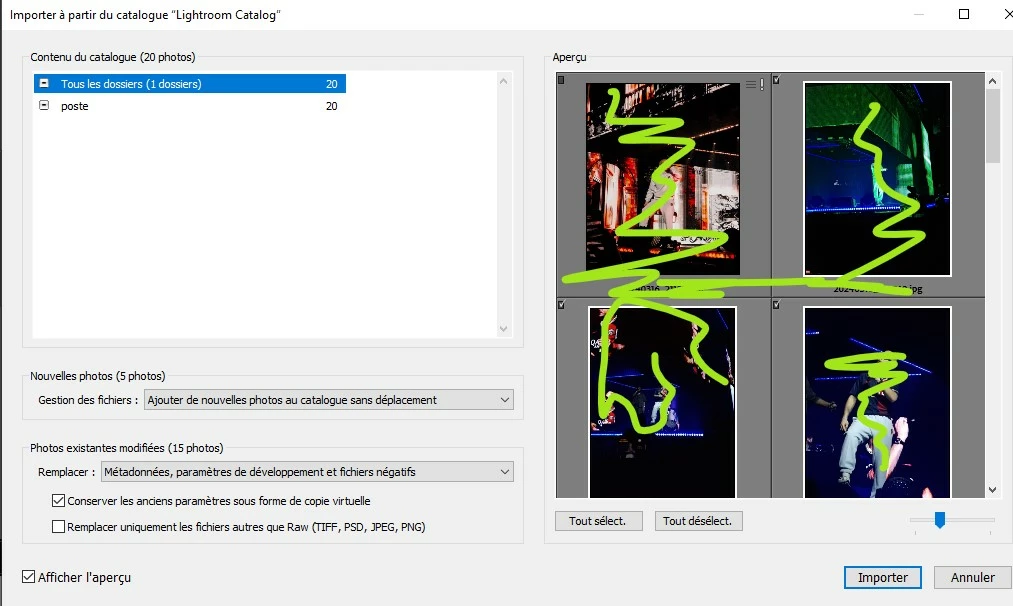
 

Je voulais importer seulement une image,  mais ducoup ca m'a tout importer et créer des copie virtuelles de mes autres photos (car c'etait une collection sauvegarde). Apres plusieurs recherches, j'aurais du choisir les paramètres remplacer : Rien. 

Je voulais savoir comment revenir en arrière sur une importation depuis un catalogue ? Comment regler ce problème et est-ce-que je suis vouée à édité mes copie virtuelles tout le long de ce catalogue ? 


Merci d'avance pour vos réponses.

Romane_lumr

This topic has been closed for replies.

1 reply

Sean McCormack
Community Expert
Community Expert
March 31, 2024

It's kinda tedious, but there is an option in the Photo menu 'Set Copy to Original' which will make those virtual copies the master file. Do this on the files and then delete the virtual copies. They should be still in the Previous Import hopefully. 

Sean McCormack. Author of 'Essential Development 3'. Magazine Writer. Former Official Fuji X-Photographer.
Sean McCormack
Community Expert
Community Expert
March 31, 2024

I just tested there and you can select multiple Virtual Copies and set them as original in one go. Then in the filter section of the filmstrip, click the Virtual Copy icon to filter for them. Select and delete. 

Sean McCormack. Author of 'Essential Development 3'. Magazine Writer. Former Official Fuji X-Photographer.