
Participant
July 5, 2022
Question

Problème depuis la version 11.4 de Lightroom Classic

  • July 5, 2022
  • 4 replies
  • 838 views

Bonjour,

Jusqu'à cette version tout fonctionnait parfaitement.

Depuis les mises à jour 11.4 et/ou 11.4.1 quand je lance "masquage sujet" (je n'ai pas essayé les autres possibilités), ça fonctionne une fois ou deux, puis une fenêtre apparait :
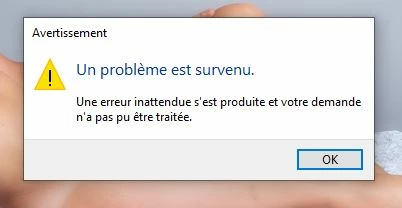
 

Pour que je puisse masquer d'autres photos je dois relancer le logiciel.

Une solution ou une explication?...

D'ici là je repasse à la version 11.3    😞

This topic has been closed for replies.

4 replies

Participant
July 12, 2022

Merci à tous.

Effectivement, il semble bien que le problème venait de la carte graphique. J'en ai désactivé le processeur et tout bfonctionne comme avant.

Il est donc vraisemblable que pour calculer les masques la version 11.4 ne fonctionne pas exactement comme la version 11.3.

Encore merci.

johnrellis
Legend
July 12, 2022

"I disabled the CPU and everything works as before. It is therefore likely that to calculate the masks version 11.4 does not work exactly like version 11.3."


Please do the menu command Help > System Info and copy/paste the output here. That will let us see precisely which hardware and drivers you're running, to help troubleshoot this issue for others.

Participant
July 12, 2022

Je suppose que c'est ce que vous demandez :


GoldingD
Legend
July 5, 2022

Please post your System Information as Lightroom Classic (LrC) reports it. In LrC click on Help, then System Info, then Copy. Paste that information into a reply. Please present all information from first line down to and including Plug-in Info. Info after Plug-in info can be cut as that is just so much dead space to us non-Techs.

Lauca
Participating Frequently
July 5, 2022

Depuis la version 11.4, LrC utilise la carte graphique (si elle le supporte) pour calculer les masques, le pilote de la carte est donc fortement impliqué. Est-ce que le pilote de ta CG est la dernière version ? Si ce n'est pas le cas je te suggère de faire la mise à jour et de voir si cela corrige le problème.

Si cela ne corrige pas, alors essaie en désactivant l'utilisation du processeur de la carte graphique dans l'onglet "Performances" des Préferences.

Sameer K
Community Manager
Community Manager
July 5, 2022

Hi Guy,


Thanks for reaching out. We are sorry for the trouble with Lightroom Classic. I’ll need a little more information. We are here to help.


Does this happen when editing images from a specific set or collection? What kind of images do you work with? RAW or JPEG? Have you tried signing out of the Creative Cloud app and signing in again? Have you tried any troubleshooting steps?


Please go to Lightroom Classic > Edit > Preferences > Performance > Use Graphics Processor > Set it to Off if it is on Custom or Auto. If this shows you any differences in performance, please check this article to troubleshoot further: https://helpx.adobe.com/lightroom-classic/kb/troubleshoot-gpu.html


Let us know if this helps,

Thanks!

Sameer K