
Participant
March 17, 2025
Question

Problème Lightroom Classic retouches impossibles

  • March 17, 2025
  • 3 replies
  • 466 views

Bonjour


Je suis en train de retoucher mes photo via lightroom classic

Après quelques temps les modifications effectuées transforment l'image d'un ecran bleu (ou noir). Impossible de revenir à la photo retouchée. Et si je l'exporte, l'image est toute noir...
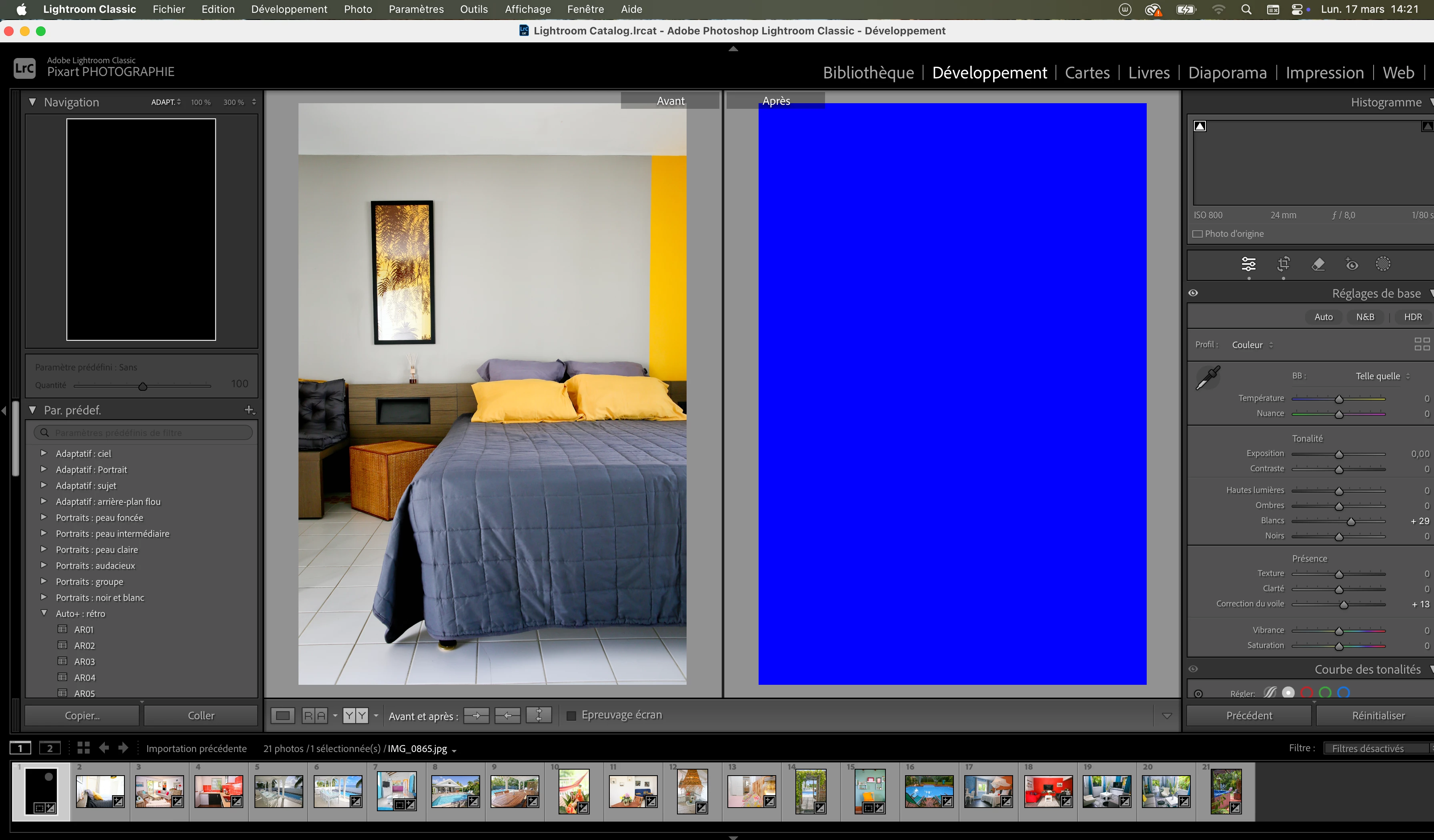
 

J'ai essayé d'éteindre puis de rallumer

La mise a jour a été effectuée il y a 25 jours...

Je travaille sur macOS sequoia 15, i9, 64go RAM, carte graphique AMD radeon pro 5500M 8Go Intel UHD Graphics 630 1535Mo

Je travaille sur ce mac depuis plus d'un an et jamais eu de problème.

Merci

3 replies

Participant
March 17, 2025

I have the same problem when using the oval mask. 
The mask turns solid black, except for a little oval or circle in the centre. The only way to make it disappear is by deleting the round mask and creating it again. It's very annoying. 

I have the same GPU as you mentioned. AMD Radeon pro 5500M 8GB Intel UHD Graphics 630 1536 MB. 

Participant
March 17, 2025

My Lightroom is in v 14.1.1, and when I go to the Adobe Desktop to update, it says it's already updated, so I don't know how to move on to v 14.2

johnrellis
Genius
March 17, 2025

@TamaraPinco: "My Lightroom is in v 14.1.1, and when I go to the Adobe Desktop to update, it says it's already updated"


In the Creative Cloud desktop app, try signing out and back in (click the personal icon/avatar in the upper-right corner).


johnrellis
Genius
March 17, 2025

"I'm working on macOS Sequoia 15, i9, 64GB RAM, AMD Radeon Pro 5500M 8GB Intel UHD Graphics 630 1535MB graphics card"


A large number of users reported that recent graphics drivers supplied by AMD to Apple for the 5000-series GPUs have been buggy.  Many have reported that Mac OS 15 and the most recent versiion of LR (14.2) avoid the problems, but there continue to be a few scattered reports of problems.   Troubleshooting steps:


1. Do Help > System Info to check your version of LR -- it's not 14.2, do Help > Updates.


2. Adobe recommends disabling the Intel GPU, following step 5:

https://helpx.adobe.com/lightroom-classic/kb/troubleshoot-gpu.html#solution-4


3. Set Preferences > Performance > Use Graphics Processor to Off.


GoldingD
Legend
March 17, 2025

Have you considered resetting your LrC preferences file. Your preferences file might be corrupt. Search the Internet on that in your language to learn out how, why, and cautions.