Problems following the instructions in BRINGING PHOTOS INTO LIGHTROOM CLASSIC
I am a newbie having Problems following the instructions in BRINGING PHOTOS INTO LIGHTROOM CLASSIC ADOBE PHOTOSHOP LIGHTROOM CLASSIC 2021 RELEASE CLASSROOM IN A BOOK, THE OFFICIAL TRAINING WORBOOK FROM ADOBE BY RC CONCEPCION, Version 10.3 up to date as of 10 June 2021`
REFERENCE: CHAPTER 2: BRINGING PHOTOS INTO LIGHTROOM CLASSIC
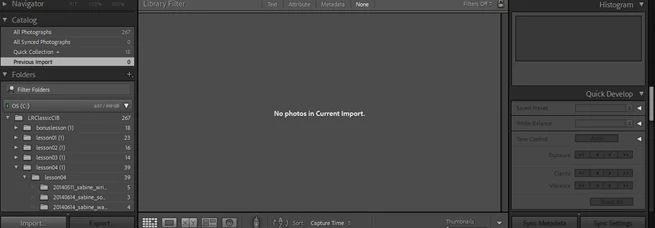
Before I begin the exercise in the book, this is what my screen looks like
Reference instructions from the book:
Page 65
Sub Paragraphs 1 and 2
- “To import images for this exercise from your computer hard disk……click the import button below the left panel group in the Library module.”
- In the source panel at the left of the import dialog box, navigate to the Lessons folder inside the LRClassicCIBfolder on your hard disk. Click the lesson 02 folder and select Include subfolders at the upper right of the panel.
An image count in the lower left corner of the import dialog box shows the lesson02folder contains a total of 16 photos with a combine file size of 874 MB.
When I perform the tasks listed in “2.,” I do not see the 16 photos with 874MB. This is what appears on screen: I get 16 photos with 3KB, and blank photos on the top as illustrated.
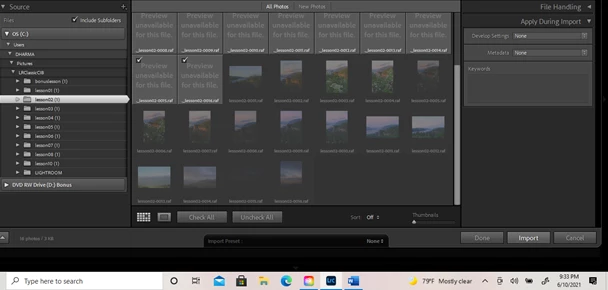
I am stuck at this point in the training.
Thank you for taking the time out of your busy schedules to help me learn Lightroom Classic.
Kevin T. Minns
Newbie
 AdChoices