
Inspiring
December 7, 2023
Question

Program Closes with no error dialogs

  • December 7, 2023
  • 2 replies
  • 2002 views

Recently, LRC has been crashing a repeatedly. When I say crash: the program just disappears - no error messages from Adobe or Windows. I looked at the Windows event viewer, it shows the following:
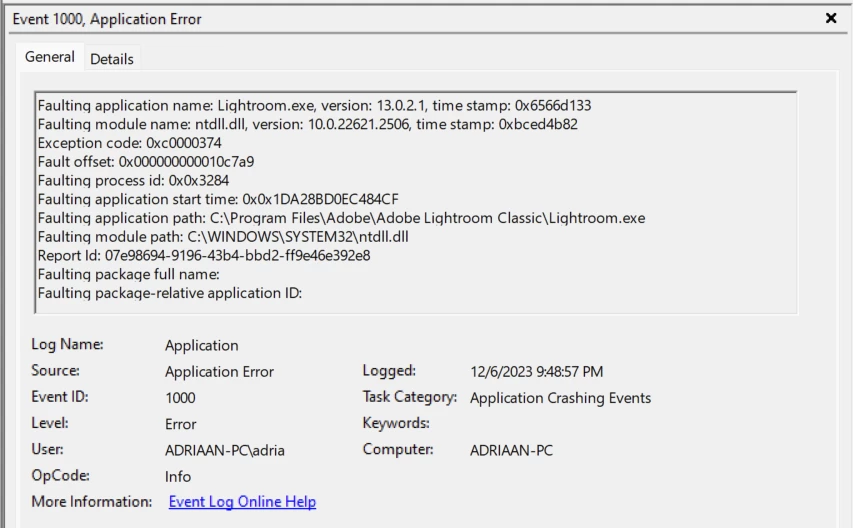
I did some searching on ntdll.dll crashing and performed the recommended system file scan with "sfc /scannow". This reported to have found some corrupt files and repaired them. I then also did a Windows update and reboot. However, a short while later it's crashing again.

What causes it to crash: in Develop module, simply selecting a different image to work with. Once, selecting the crop tool. It does not crash on the first few images, it takes a while (I don't have number on this). It is random as far as I can tell. I don't have problems with any other software.

>LRC version: 13.0.2

>Windows version: 11 Pro, build 22H2

Please let me know if there is a fix for this, or if I can provide more information.

In the meantime I'll try rolling back to an earlier version, e.g. 13.0.1.

Thanks, Adriaan


[moved from bugs to discussions according to the community rules - Mod.]

This topic has been closed for replies.

2 replies

GoldingD
Legend
December 7, 2023

Sounds very much like:

https://community.adobe.com/t5/lightroom-classic-discussions/lrc-13-0-2-still-crashes/m-p/14283803#M347743


Bring up Google, and search on:

Faulting module name: ntdll.dll


Perhaps as a MS site discussion on that might help

Adriaan_SAuthor
Inspiring
December 11, 2023

I took a look at your link, thanks. One suggestion relates to the graphics processor. I tried the following:

(1) Update to the latest NVIDIA studio driver: still crashing.

(2) Install an earlier version NVIDIA driver I had: still crashing.

(3) Roll back to LRC 13.0.0 (versions before that cannot read my current catalog): still crashing.

(4) Turn off the graphics processor: this works (so far at least) [with LRC and video driver updated to the current versions).

>This is strange, because #2 and #3 should have put the system back in an earlier state before the crashes occurred. Maybe something else is causing the problem?

Finally I looked more online on the nldll.dll error.  One post I found stated that the exception code is the more important part of this. That code is 0xC0000374. This is a "STATUS_HEAP_CORRUPTION". That post also stated that these are difficult to trace. Another post stated "Assuming that your Windows system is up to date and none of the usual checks for corruption has indicated a problem ( system file checker, dism ) then this is an issue that should be addressed by the author of the application." As I explained, my Windows is up to date and I have already done the system file checker and dism checks.

>>At this point, further trouble shooting is beyond my abilities.

Let me know if there are specific suggestions I can try, or specific information I can provide. Barring that, I'll have to leave the graphics processor turned off.

Adriaan

GoldingD
Legend
December 12, 2023

Contact actual Adobe, perhaps by initiating a chat, and requesting a call. Try to get some Adobe Tech involved.


Keep good notes, as if your issue gets resolved, you will be able to help others with this issue, or at least place in your discussion as so others can see it.


F. McLion
Community Expert
Community Expert
December 7, 2023

Please share the first blocks (approx. 45 lines) of your system information from the LrC help menu.

Paste the information as text here rather than as a screen capture.


--- Got your issue resolved? Please label the response as 'Correct Answer' to help your fellow community members find a solution to similar problems. ---
Adriaan_SAuthor
Inspiring
December 7, 2023

Lightroom Classic version: 13.0.2 [ 202311290958-8ff975ea ]
License: Creative Cloud
Language setting: en
Operating system: Windows 11 - Business Edition
Version: 11.0.22621
Application architecture: x64
System architecture: x64
Logical processor count: 12
Processor speed: 3.6GHz
SqLite Version: 3.36.0
CPU Utilisation: 2.0%
Built-in memory: 32702.4 MB
Dedicated GPU memory used by Lightroom: 2658.7MB / 8032.0MB (33%)
Real memory available to Lightroom: 32702.4 MB
Real memory used by Lightroom: 1905.8 MB (5.8%)
Virtual memory used by Lightroom: 4907.1 MB
GDI objects count: 715
USER objects count: 2831
Process handles count: 5244
Memory cache size: 152.6MB
Internal Camera Raw version: 16.0 [ 1677 ]
Maximum thread count used by Camera Raw: 5
Camera Raw SIMD optimization: SSE2,AVX,AVX2
Camera Raw virtual memory: 547MB / 16351MB (3%)
Camera Raw real memory: 311MB / 32702MB (0%)
System DPI setting: 120 DPI
Desktop composition enabled: Yes
Standard Preview Size: 1440 pixels
Displays: 1) 2560x1440
Input types: Multitouch: No, Integrated touch: No, Integrated pen: Yes, External touch: No, External pen: Yes, Keyboard: No

Graphics Processor Info:
DirectX: NVIDIA GeForce RTX 3070 (31.0.15.4601)
Init State: GPU for Export supported by default
User Preference: Auto

Application folder: C:\Program Files\Adobe\Adobe Lightroom Classic
Library Path: D:\LR_Catalogs\LR-Main-v13.lrcat
Settings Folder: C:\Users\adria\AppData\Roaming\Adobe\Lightroom

Installed Plugins:
1) AdobeStock
2) Epson Print Layout
3) Flickr
4) LogiOptions
5) Nikon Tether Plugin
6) ON1 Photo RAW 2021
7) ON1 Resize 2021
😎 Topaz Photo AI