


Known Participant
Oct 29, 2026 9:56 PM UTC
Answered

PS ignoring the adjustments made and saved when printing

I am trying to print one of my images which contains a good bit of orange.  The image was converted to LAB and the a and b channels made a bit more vertical to bring out the colors.  Yet the image prints in a manner which ignores the adjustments made in LAB.


I am using current versions of LR and PS with an Epson 9570 printer along with a custom profile for Hahnemuhle Fine Art Baryata paper.


Three images are attached.  One printed with Pro-foto color space, another LAB, and the 3rd being a photo of the screen.  The latter shows the colors I am trying to achieve (although over-saturated in the cell phone photo).  When soft-proofing the orange colors and just about everything else (except for some very deep greens) are all within gamut.


I look forward to your advice.

Bob Greenberg

rsg.photo.1@gmail.com
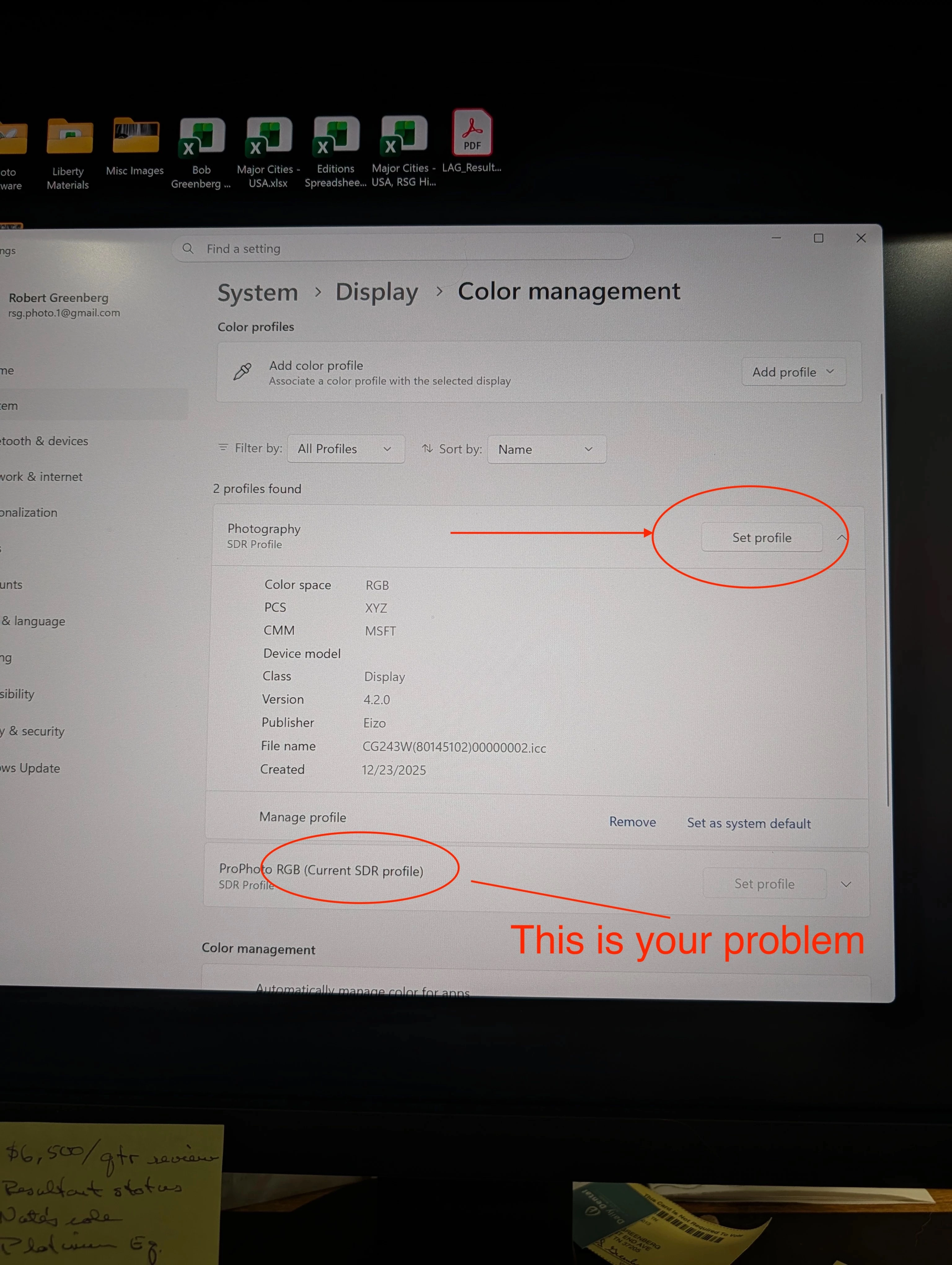
 

    Jao vdLCorrect answer
    Community Expert
    Nov 2, 2026 12:01 AM UTC

    @Bob G21. Yes this is your problem indeed. You set the monitor to BT 2020 color mode  and the operating system is set to send it prophotoRGB. That is definitely incorrect. You probably should simply select the calibrated profile for the monitor in the color management property dialog on your computer. See below. 


    10 replies

    Community Expert
    Oct 31, 2026 6:13 PM UTC

    Not sure I understand how you are printing this. Are you printing directly from the print panel with the Hahnemuhle profile selected? That should give you output the same as the soft proof in Lightroom Classic. Or are you printing from Photoshop? If so that is a photoshop print problem or a print driver problem. You talk about Lab adjustments which I am assuming means you are editing in Photoshop as you can’t convert or edit in Lab in Lightroom. 

    Most likley this is an issue with your print driver and not Lightroom. Epson drivers have a habit of misconfiguring themselves and messing with the color.

    Lastly, how well calibrated is your display? That to exclude the very obvious. A non-calibrated screen will never give you prints that correspond to the soft proof.

    Translate
    Bob G21.Author
    Known Participant
    Oct 31, 2026 10:34 PM UTC

    Hello Jao:

    I am printing from photoshop, which is how I always print.  I have tried using my custom printer profiles as well as the standard Epson profiles.  I have tried using some Moab paper with custom and standard (downloaded from Moab) profiles.  Results are always the same.  I have also tried printing directly from Lightroom.  And earlier today I updated the firmware of the 9570 and the associated Epson printing software.  Nothing changes on the prints.  At the moment I am running a power cleaning on the orange and green channels as I can not think of anything else.

    My monitor is an Eizo and was recently profiled using the embedded hardware profile capability.

    Appreciate your continued thoughts~!

    Bob G

    Translate
    Community Expert
    Oct 31, 2026 11:21 PM UTC

    Make sure you have the correct monitor profile selected if you use the embedded hardware calibrations. It is possible that your monitor profile is simply set to the wrong profile that doesn’t correspond to what the monitor calibrated itself to.

    If your monitor is well calibrated (and the profile associated with the monitor is correct) and prints come out wrong regardless of the application you use, it is the driver or something is wrong in the printer itself. 

    Translate
    Community Expert
    Oct 30, 2026 10:22 AM UTC

    Could you please share your colour management situation - is the monitor profiled and how, (there are no selectable options inside LrC), what are the display and colourspace handling settings inside PS.

    Also, when you say printed “with” ProPhoto colourspace, or “with” LAB - what do you mean? One would normally AFAICT expect to be printiing “with” conversion to the appropriate paper- and device-specific calibration profile. After, optionally, softproofing to that same output profile. Softproofing to (for example) ProPhoto would not be informative about your actual gamut as printed.

    Or - are you printing from within Photoshop? 

    Translate
    Bob G21.Author
    Known Participant
    Oct 31, 2026 10:35 PM UTC

    Hello Richard, et al:


    Below please find answers to your questions.


    1. I use an Eizo monitor which is profiled using the internal EIZO mechanism;
    2. The working space inside PS is profoto;
    3. I printed the image with Profoto as the source space using a custom profile for the Hahnemuhle Fine Art Baryata Paper as the destination space.  This profile has been used many times in the past.  Also, I converted the image to a TIFF as the source space and printed using the custom profile as an experiment but with the same brownish image result.
    4. Don’t know what AFAICT means, but I am printing with conversion to the appropriate paper.  Thinking the printing profile might be corrupted I just made a test image using Moab Exhibition Lustre 300 with its corresponding (both with a custom profile and one downloaded from the MOAB website) printer profile and the resulting prints are the same (except for slight differences based on the paper gamut);
    5. Soft proofing to the Hahnemuhle profile yields the image which I photographed and uploaded; that is, there is no change in the image from its display before or after soft proofing.
    6. In the printed image the mountains are brown instead of orange per the earlier uploaded images.
    7. I brought out the orange color in the mountains through conversion to LAB and making the “a” and “b” channels more vertical and then converted back to RGB.  The printed image has the appearance of prior to the LAB adjustments.  Hence, I think there may be a PS or LR bug which is preventing PS from utilizing the LAB adjustments even though I have not had this happen before.


    Bob G

    Translate