
Inspiring
March 6, 2023
Question

PS/LR interface problem

  • March 6, 2023
  • 3 replies
  • 273 views
I have issues when I edit LR images in PS, the background is as follows:-
 
I only hold WIP images on Mac’s internal SSD, the bulk of my images are held on an external HDD named "LR Archive 2".
 
When I edit images in PS shop, I use LR’s "Edit In" to pass the image to PS and when finished, I do a PS "Save" and it normally returns the image to the appropriate LR folder.
 
Yesterday when I did this, it was saved in a duplicate of "LR Archive 2", physically its in the correct folder on the HDD but LR is showing two "LR Archive 2" folders as per the screen shot.
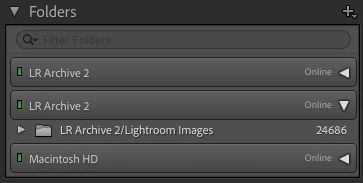
 
I have changed no settings, there was a PS update recently and I do keep all my software up to date.
 
Has anyone else had this problem and if so how did they resolve it
 
Thanks in advance
This topic has been closed for replies.

3 replies

Inspiring
March 7, 2023

I finally got this sorted, an Adobe tech logged onto my machine and tried all sorts of things with no success.  He diadnosed it as a LR Catalogue issue and recomended creating a new catalogue and importiing all my stuff into it.  So i did following the steps:-


1. Exported all my images as a catalogue in LR

2. Created a new catalogue

3. Imported all my images as a catalogue into the new catalogue


It worked and even rebuilt my collections, so its so far so good and thank you for the coments


Rob_Cullen
Community Expert
Community Expert
March 6, 2023

Seeing the same Drive twice in the Folders panel should not occur and requires a special fix to correct. (Simply moving folders or files about will not fix.)

Follow the advice in this link-

DUPLICATE DRIVE displays same hard drive twice


Regards. My System: Windows-11, Lightroom-Classic 15.1.1, Photoshop 27.3.1, ACR 18.1.1, Lightroom 9.0, Lr-iOS 10.4.0, Bridge 16.0.2 .
Inspiring
March 6, 2023

Two more bits of information:-


1. I replicated the problem on a backup HDD, so I don't believe its linked to a specific HDD problem 


2. When I remove the images for the duplicate "LR Archive 2" folder in LR, the duplicate folder is automatically deleted.