
tracielizabeth
Participant
May 4, 2023
Answered

purchased presets disappeared in Lightroom classic after I viewed ai denoise

  • May 4, 2023
  • 2 replies
  • 1300 views

I have tried everything I have found in the community search online and my presets are nowhere to be found... I have tried settings, preferences, presets clicked on "show partially compatible presets" and nothing changes. This all happened last night after I viewed the new ai denoise tutorial through lightroom. I use a Macbook Pro. Any help would be greatly appreciated 🙂
    This topic has been closed for replies.
    Correct answer Sameer K

    Hey @tracielizabeth. Welcome to the Lightroom Community. I'll help you figure this out. What version of macOS are you working on?


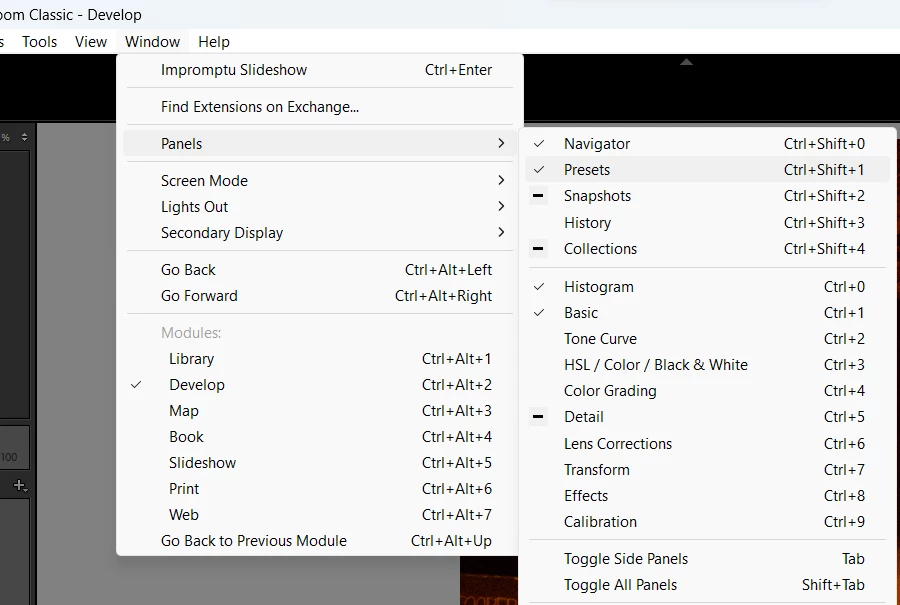
    All the panels in Lightroom Classic's modules are customizable & just as @JohanElzenga recommended, you can bring back the Preset Panel.


    Go to Window (at the top menu) > Panels > Select Presets or click on 'Toggle All Panels'


    If non of the above steps help, try resetting Lightroom Classic following the second (manual) method from this article: https://helpx.adobe.com/lightroom-classic/help/setting-preferences-lightroom.html


    Let me know how it goes. Thanks!
    Sameer K

    2 replies

    tracielizabeth
    Participant
    May 4, 2023

    Hello! I have searched the community and tried everything I have found and nothing is working. Last night after I viewed ai noise tutorial, all of my presets and the preset tab disappeared. I have checked  and unchecked everything I was supposed to under the "develop" presets tab. I know they are there, but I just cannot figure out how to access them. I use a Macbook pro. Any help greatly appreciated 🙂

    JohanElzenga
    Community Expert
    Community Expert
    May 4, 2023

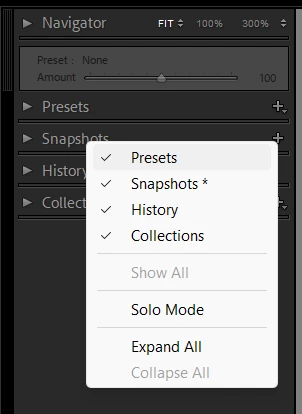
    If the presets tab has disappeared, then right-click in an empty part of another tab header. You will get a contextual menu with the option to hide/unhide tabs.


    -- Johan W. Elzenga
    tracielizabeth
    Participant
    May 4, 2023

    omgoodness, who knew it was that easy.. thank you so much!

    John T Smith
    Community Expert
    Community Expert
    May 4, 2023

    You need to ask program questions in the forum for the program you are using
    To ask in the forum for your program please start at https://community.adobe.com/
    Moving from Using the Community (which is about the forums) to the correct forum

    tracielizabeth
    Participant
    May 4, 2023

    oh sorry about that! thanks for pointing it out