
nealb2790011
Participant
January 16, 2017
Answered

Radial filter problem

  • January 16, 2017
  • 1 reply
  • 4297 views

Lightroom CC - Using the radial filter, invert checked and unchecked, adjustments apply to the whole image

and not just inside or outside the oval. LR and computer has been restarted, also feathering not the issue

performs the same thru the entire range.
    This topic has been closed for replies.
    Correct answer Just Shoot Me

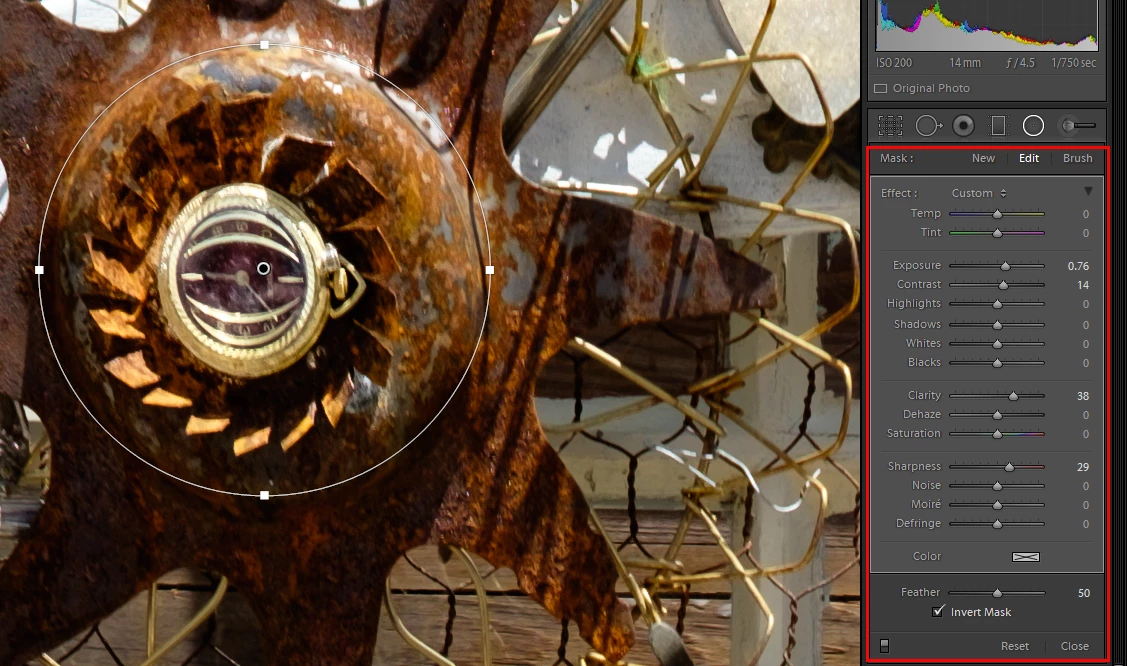
    Please post a screen shot. I suspect you aren't really in the Radial Filter. you should get an adjustment section like this.

    And that is where you should be making adjustments.

    1 reply

    Just Shoot Me
    Just Shoot MeCorrect answer
    Legend
    January 17, 2017

    Please post a screen shot. I suspect you aren't really in the Radial Filter. you should get an adjustment section like this.

    And that is where you should be making adjustments.

    Rob_Cullen
    Community Expert
    Community Expert
    January 17, 2017

    It is possible to scroll down and be applying global adjustments in the "BASIC" Panel which is just below the Radial Filter (and Brush) panel when a tool is active.

    And even more confusing if the Tool panel is converted to the minimal "Amount" slider, as in this screen-clip.

    So be sure you are adjusting within the correct panel.

    Regards. My System: Windows-11, Lightroom-Classic 15.4.1, Photoshop 27.8, ACR 18.4, Lightroom 9.4, Lr-iOS 10.4.0, Bridge 16.0.3 .
    danielg22609008
    Participant
    October 12, 2018

    I agree, it IS confusing!

    And I have no clue how to display the "advanced" radial filter panel.

    Where would I find that?