
Participant
October 22, 2017
Answered

Range Mask Seelction and Sliders Off Screen

  • October 22, 2017
  • 1 reply
  • 1723 views

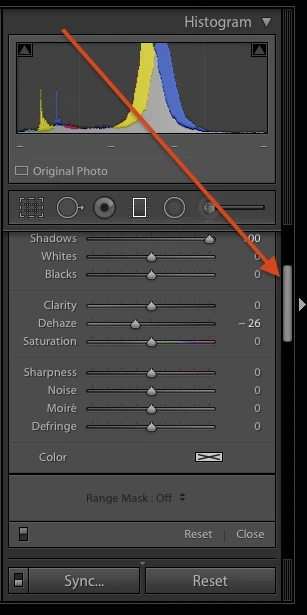
With Lightroom CC Classic I find that when using the adjustment brush or the radial or graduated filters the Range Mask Selection and sliders are out of sight. In order to see them I have to either resize the picture strip at the bottom of the display or turn off the histogram. Is there a way to get that window to scroll when the Range Mask elements are off the screen?
This topic has been closed for replies.
Correct answer johnrellis

Use the scrollbar on the far right:

1 reply

johnrellis
johnrellisCorrect answer
Legend
October 22, 2017

Use the scrollbar on the far right:

Legend
October 22, 2017

I have encountered a very similar/same? problem: The adjustment brush range mask sliders are visible but the reset & brush on/off toggle switch are hidden for the Color mode only, it fits for Luminance mode.

I found the scroll bar handle stays off (using a 1920x1200 monitor) so you cannot scroll the panel.

Workarounds are as the OP describes: to either turn off histogram or resize filmstrip.

Also the side panel scrollbar handle will also reappear if I resize my Lightroom window down about 1" on my main monitor or when using LR on the 2nd monitor 1680x1050. Using fullscreen mode works too giving the panel more total space to fit.

It just would be nice that the scrollbar handle would reappear when needed with the additional screen space the range mask sliders occupy.