
Known Participant
February 5, 2024
Question

Rebuild sync data - what does it do, and how do I know it is doing it?

  • February 5, 2024
  • 1 reply
  • 4638 views

Hoping to hear from Adobe engineers. It bugs me that a version of this question has been asked a number of times with 0 answers. I undertand if users don't know the answer, but what about Adobe?


My sync got stuck, I wrote about it at length in https://community.adobe.com/t5/lightroom-classic-discussions/sync-is-stuck-in-lightroom-classic-without-errors/m-p/14381921


I decided to try Rebuild sync data (after trying other solutions that worked for some). It warned me that it may take a while, and that sync will be unavailable while it's running. I agreed.


My LrC got restarted, and my sync is paused. There is no progress indcator and no estimate when the rebuild will be completed. I am watching my Lightroom folder on the harddrive. The Previews.lrdata is getting updated, but since I did not stop working in LrC, I am not sure if it's updating because of what I am doing or because of the rebuild. Some of the other files are stuck with the timestamp of 12:32 PM, which is when I initiated the rebuild. 
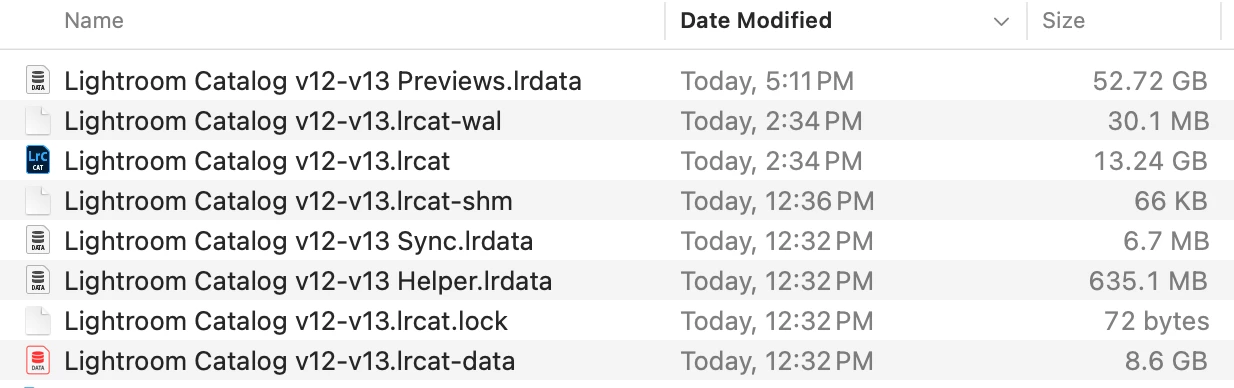
 

Does anyone have any expereince with productive Rebuild sync process, and what was your expereince?


Adobe, what do you say? LrC 13.1, MacOS 14.0

This topic has been closed for replies.

1 reply

KostFan2
Known Participant
February 5, 2024

@alexeit20270339 

  • What: I believe it rebuilds the index by comparing DATA in the Primary Catalog. lrcat to the Index on the Master Database on Adobe’s servers to identify issues: missing files, etc.


  • Time Required: You should not use Lrc until it finishes rebuilding, it should not take too long. For example if, I synced my entire catalog from scratch that takes about 8 hours because files are being transferred from Computer to Adobe’s servers.  In contrast, if I rebuild the index it can take less than 15 minutes because only data is being compared.  I do not believe that any files are being moved.

    Please see the attached file

KostFan2
Known Participant
February 5, 2024

From your linked longer post, it seems that you already performed most of these steps.  However, see the attached file just in case.

Known Participant
February 5, 2024

Will do. As for rebuild, it has been 20 hours since I initiated it and 9 hours since I last touched LrC last night. Sync is still paused, and that is my only indication that rebuild is in progress. It would be good to know more and how long it will be.

No files look like they are updating in the background.

When you said it should not take long, you did not ask me how many photos I have. The size of the catalog surely must matter. Adobe claim they can handle large catalogs, but all evidence is to the contrary. I have 263K photos, 259K of them synched.


Interesting point you make about videos.