



Energetic_leader1549
Inspiring
June 23, 2025
Answered

Recover space in the .lrcat-data file

  • June 23, 2025
  • 1 reply
  • 259 views

In the new Lightroom Classic 14.4, if you roll back a Denoise edit in the History panel, can you reclaim the space it used in the .lrcat-data file by running Optimize Catalog to reduce the file size? I assume the same question applies to other data stored in .lrcat-data too, such as masks, healing layers, and AI-driven edits?

Correct answer Ian Lyons

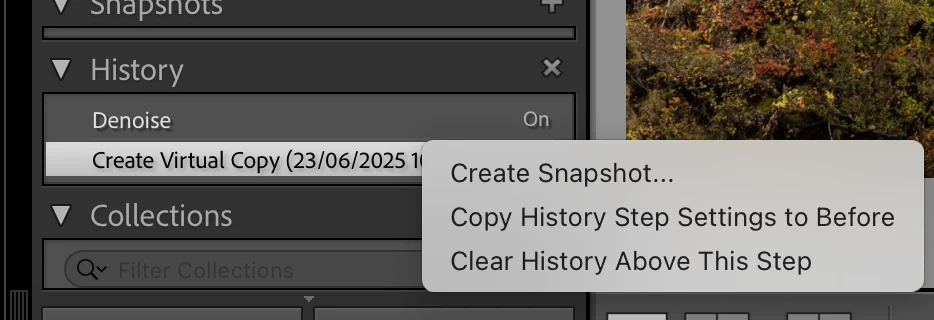
Simply stepping back through History will not clear the date, even if you use Optimise Catalog. To remove the data you need to use 'Clear History Above This Step'. I've attached a screenshot that shows how.


1 reply

Ian Lyons
Community Expert
Ian LyonsCommunity ExpertCorrect answer
Community Expert
June 23, 2025

Simply stepping back through History will not clear the date, even if you use Optimise Catalog. To remove the data you need to use 'Clear History Above This Step'. I've attached a screenshot that shows how.