Heirloom Bob
Inspiring
July 29, 2025
Answered

Red dot

  • July 29, 2025
  • 2 replies
  • 292 views

Windows 11 and Lightroom Classic. Can someone explain this red dot. What does it signify?
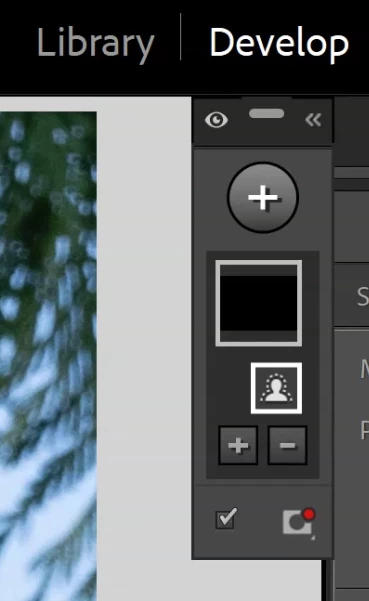
Correct answer Rob_Cullen

Red Dot  =  Red Overlay color.


2 replies

Rob_Cullen
Community Expert
Rob_CullenCommunity ExpertCorrect answer
Community Expert
July 29, 2025

Red Dot  =  Red Overlay color.


Regards. My System: Windows-11, Lightroom-Classic 15.1.1, Photoshop 27.3.1, ACR 18.1.1, Lightroom 9.0, Lr-iOS 10.4.0, Bridge 16.0.2 .
JohanElzenga
Community Expert
Community Expert
July 30, 2025

Interesting! I have no idea why Adobe thinks that is information you'll need to see when the panel is collapsed...


-- Johan W. Elzenga
JohanElzenga
Community Expert
Community Expert
July 29, 2025

The AI mask needs to be updated.


-- Johan W. Elzenga
Heirloom Bob
Inspiring
July 29, 2025

I click on the AI Edit Status icon. It brings up the following AI tools have been used in this photo: Masking. Now how do I update the mask?

JohanElzenga
Community Expert
Community Expert
July 29, 2025

H'm. Apparently the mask does not need to be updated, so maybe I was wrong about that (I have docked the mask panel, so I never see it this way). Maybe it just means you have an AI mask, not that it needs updated. How does the panel look when expanded? Can you post a screenshot of that too?


-- Johan W. Elzenga