Participating Frequently
October 31, 2017
Answered

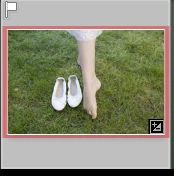
Red Frame around thumbnail

  • October 31, 2017
  • 2 replies
  • 5980 views

So far the change from Lr to Lr Classic has worked fine. There is just one thing that caught my eye, and I don't know what to make of it.
When in Develop Mode some of my thumbnails have a red frame around them, and if it is a saved back file from Ps, then the original has a reddish background. What does that mean? I don't have a clue as to what I might have done to make that happen as a lot of other pictures were treated the same way.
This hasn't hampered my workflow in the least, but I'd still like to know why it goes red all of a sudden.
Thanks for any explanation.
Tom

This topic has been closed for replies.
Correct answer Abambo

Like this?

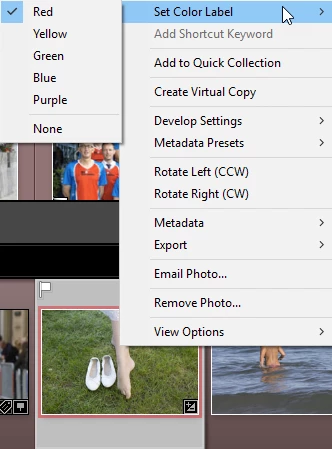
You have a "red" label attached to the picture. You have several colours available to mark your pictures:

The meaning of those labels are up to you. You attribute them with RMB (or Command Click on the Mac) on a picture and choosing "Set Color Label":

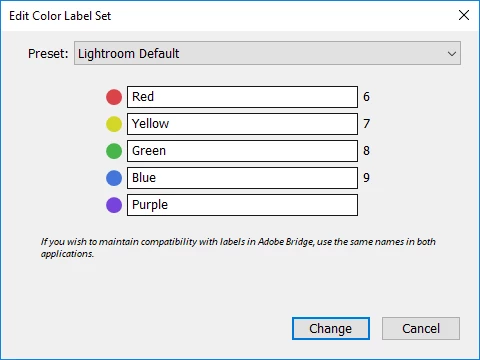
or by using the numerical keyboard (6-9), purple needs to be attributed manually. You can even edit the meaning of the colour labels (Metadata->Color Label Sets):

2 replies

tom_chAuthor
Participating Frequently
October 31, 2017

Thanks. That was it. I never use that feature, so obviously must have hit it accidentally somehow.
But now that the mystery is gone, maybe I should start using it.

Abambo
Community Expert
Community Expert
November 1, 2017

Yes, you should do. It’s quite useful for marking and selecting pictures for different needs. FYI: 0-5 on the keyboard attribute stars to a picture.

ABAMBO | Hard- and Software Engineer | Photographer
Abambo
Community Expert
AbamboCommunity ExpertCorrect answer
Community Expert
October 31, 2017

Like this?

You have a "red" label attached to the picture. You have several colours available to mark your pictures:

The meaning of those labels are up to you. You attribute them with RMB (or Command Click on the Mac) on a picture and choosing "Set Color Label":

or by using the numerical keyboard (6-9), purple needs to be attributed manually. You can even edit the meaning of the colour labels (Metadata->Color Label Sets):

ABAMBO | Hard- and Software Engineer | Photographer