
Participant
September 27, 2026
Answered

Reflections Removal is giving me garbage. Known bug or user incompetence?

  • September 27, 2026
  • 11 replies
  • 68 views

The Reflection Removal Tool is not working for me.  I am running LrC on an iMac.  I always start with a DNG image of a shop window and use the tool as the first action in my Develop workflow.  The attached file is representative of the results I get consistently no matter the image.

Please share your insights on how to fix.


Thanks,


R

    Correct answer johnrellis

    [View this post in your web browser. It contains formatting and images that don't appear in email.]


    My LR 15.5.1 / Mac OS 26.6.2 / Macbook Pro (M2 Max) does pretty good removing the reflections from the sample JPEG you provided:
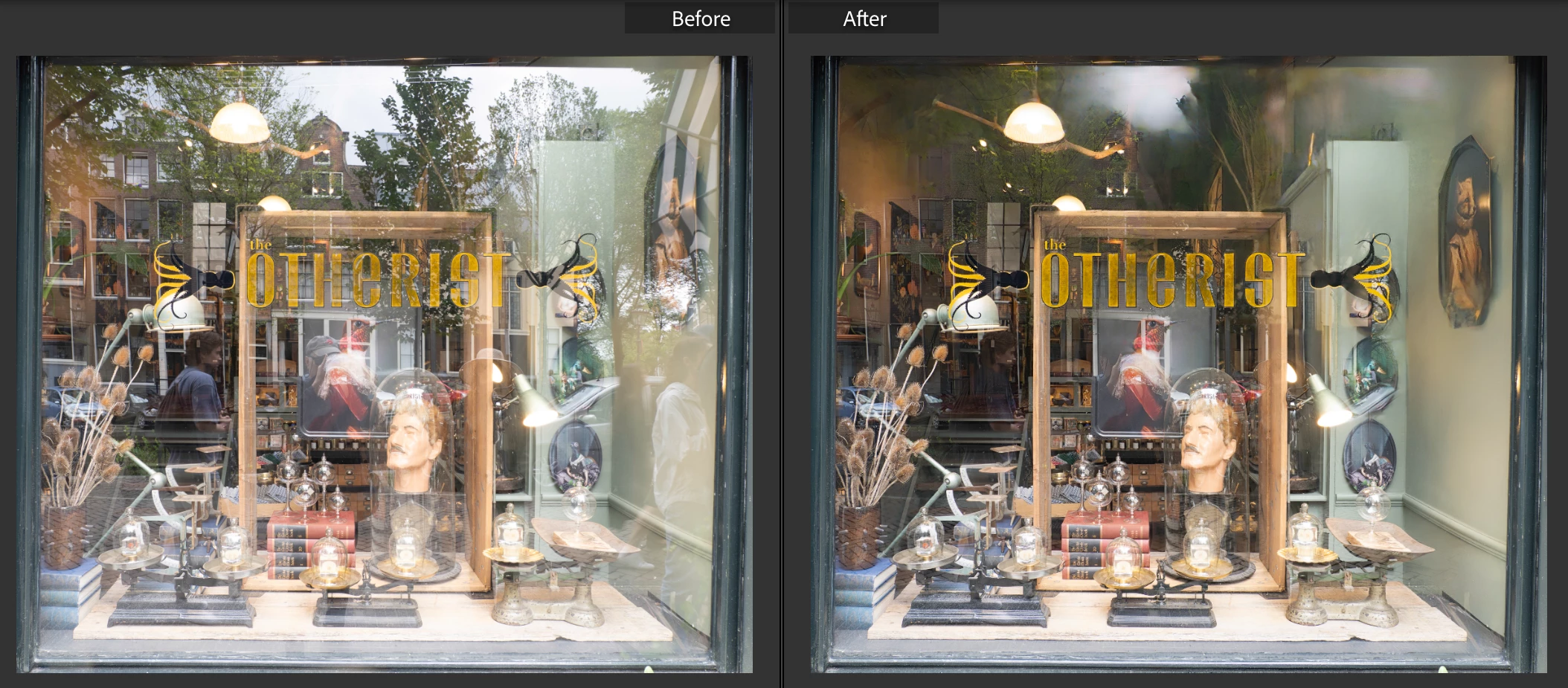
     

    I think your problem is caused by the graphics driver in your configuration:

    Operating system: Mac OS 14
    Version: 14.8.5 [23J423]
    Metal: AMD Radeon Pro 575X


    There are two possible issues, both related to buggy graphics drivers. (LR’s AI commands are very sensitive to bugs in drivers, of which there have been many.)


    1. That graphics driver is likely two years old. The last non-security release of Mac OS 14 was two years ago (14.7).  Subsequent releases of Mac OS 14 were security patches, which generally don’t contain driver updates.  


    Updating to Mac OS 15 (I think the latest your computer supports) would get newer AMD graphics drivers, possibly fixing this problem.


    2. The latest graphics drivers for the AMD Radeon 500- and 5000-series GPUs included in Intel Macs, released in Mac OS 26.3,  are buggy, tripping up LR’s People Masking and other some other LR AI features:

    https://community.adobe.com/questions-675/p-people-masking-fails-on-mac-intel-1551766/index1.html?sort=oldestFirst#comments


    This was first reported in February 2026, and Apple and AMD have not released updated graphics drivers in Mac OS. Given that Apple stopped shipping Intel Macs (with AMD GPUs) six years ago, and Apple has dropped support for Intel Macs entirely in Mac OS 27, I think it’s unlikely that Apple and AMD will release further updates to graphics drivers for Intel Macs.


    11 replies

    johnrellis
    Legend
    September 27, 2026
    johnrellis
    johnrellisCorrect answer
    Legend
    September 27, 2026

    [View this post in your web browser. It contains formatting and images that don't appear in email.]


    My LR 15.5.1 / Mac OS 26.6.2 / Macbook Pro (M2 Max) does pretty good removing the reflections from the sample JPEG you provided:


    I think your problem is caused by the graphics driver in your configuration:

    Operating system: Mac OS 14
    Version: 14.8.5 [23J423]
    Metal: AMD Radeon Pro 575X


    There are two possible issues, both related to buggy graphics drivers. (LR’s AI commands are very sensitive to bugs in drivers, of which there have been many.)


    1. That graphics driver is likely two years old. The last non-security release of Mac OS 14 was two years ago (14.7).  Subsequent releases of Mac OS 14 were security patches, which generally don’t contain driver updates.  


    Updating to Mac OS 15 (I think the latest your computer supports) would get newer AMD graphics drivers, possibly fixing this problem.


    2. The latest graphics drivers for the AMD Radeon 500- and 5000-series GPUs included in Intel Macs, released in Mac OS 26.3,  are buggy, tripping up LR’s People Masking and other some other LR AI features:

    https://community.adobe.com/questions-675/p-people-masking-fails-on-mac-intel-1551766/index1.html?sort=oldestFirst#comments


    This was first reported in February 2026, and Apple and AMD have not released updated graphics drivers in Mac OS. Given that Apple stopped shipping Intel Macs (with AMD GPUs) six years ago, and Apple has dropped support for Intel Macs entirely in Mac OS 27, I think it’s unlikely that Apple and AMD will release further updates to graphics drivers for Intel Macs.


    Participant
    September 27, 2026

    Thank you so much!  I will try updating to Mac OS 15 and see if that fixes the problem.

    Known Participant
    September 27, 2026

    Thanks for your comment. Just realized the Dropbox link is to a jpeg. When back at my computer in less than 2 hours I will attach the DNG. It is 20 MB. 

    johnrellis
    Legend
    September 27, 2026

    Building on ​@dj_paige’s reply, reflection removal is far from perfect, but it works often enough for many people (including me) to be quite useful.  It’s hard to tell from the screenshot you posted whether your issue is another imperfection of the tool’s AI algorithm, a problem particular to your configuration, or something else. That’s why sharing an example DNG and your System Info will help to narrow down the problem and, if it’s a problem with the current AI algorithm, provide an actionable example to Adobe.


    If the DNG is 47 MB or smaller, you can attach it directly to your reply using the paper-clip button at the bottom of the reply window.

    Participant
    September 27, 2026

    Thanks again for your help.

    Here is the dropbox link to the original image

    https://www.dropbox.com/scl/fi/ybu3voiab7mfbrzi1sfvu/untitled-65-2.jpg?rlkey=g137getajy93s7f05hftdpozf&st=i41omzwe&dl=0

    Here is the system info:

    Lightroom Classic version: 15.5 [ 202607291506-b8869fa7 ]
    License: Creative Cloud
    Language setting: en-US
    Operating system: Mac OS 14
    Version: 14.8.5 [23J423]
    Application architecture: x64
    Logical processor count: 6
    Processor speed: 3.1GHz
    SqLite Version: 3.36.0
    Adobe GSDK Version: 1.4.0.213

    Built-in memory: 36,864.0 MB
    Dedicated GPU memory used by Lightroom: 2,657.9MB / 4,096.0MB (64%)
    Real memory available to Lightroom: 36,864.0 MB
    Real memory used by Lightroom: 7,109.0 MB (19.2%)
    Virtual memory used by Lightroom: 52,110.7 MB
    Memory cache size: 2,555.7MB
    Internal Camera Raw version: 18.5 [ 2673 ]
    Maximum thread count used by Camera Raw: 4
    Camera Raw SIMD optimization: SSE2,AVX,AVX2
    Camera Raw virtual memory: 1574MB / 18431MB (8%)
    Camera Raw real memory: 1698MB / 36864MB (4%)

    Cache1: 
    Final1- RAM:178.0MB, VRAM:0.0MB, untitled-155-2.DNG
    Final2- RAM:191.0MB, VRAM:849.0MB, untitled-65-2.DNG
    NT- RAM:369.0MB, VRAM:849.0MB, Combined:1,218.0MB

    Cache2: 
    m:2,555.7MB, n:326.0MB

    U-main: 115.0MB

    Standard Preview Size: 2048 pixels
    Displays: 1) 5120x2880

    Graphics Processor Info: 
    Metal: AMD Radeon Pro 575X
    Init State: GPU for Image Processing supported by default
    User Preference: Auto
    Enable HDR in Library: OFF
    GPU for Preview Generation: Auto (S3_4)

    Application folder: /Applications/Adobe Lightroom Classic
    Library Path: /Users/pensieve/Pictures/Lightroom/Lightroom Catalog-2-v13-4.lrcat
    Settings Folder: /Users/pensieve/Library/Application Support/Adobe/Lightroom

    Installed Plugins: 
    1) AdobeStock
    2) Aperture/iPhoto Importer Plug-in
    3) Canon Print Studio Pro
    4) Canon Professional Print & Layout
    5) ColorChecker Camera Calibration
    6) DxO PhotoLab 2
    7) DxO PhotoLab 2 Importer
    8) DxO PureRAW 5
    9) DxO PureRAW 5 Importer
    10) Flickr
    11) Nik 6 HDR Efex
    12) Nik 8 HDR Efex
    13) Plugin Parameters
    14) Plugin Parameters
    15) Topaz Photo AI

    Config.lua flags: 


    Known Participant
    September 27, 2026

    I will post my configurations shortly when I’m back at my computer

    Known Participant
    September 27, 2026

    Thanks for replying. I’ve tried the tool with at least 10 different images over the years. So posting one is likely to be misleading. All are of shop windows with displays that are busy. some were shot  with iPhones of various vintages, others were shot with full frame 35 mm cameras. None of them look anything like the mess that the tool produces. I see no relationship in any way between what I attached from the tool and what is in the image underline it.


    dj_paige
    Legend
    September 27, 2026

    Thanks for replying. I’ve tried the tool with at least 10 different images over the years. So posting one is likely to be misleading. All are of shop windows with displays that are busy. some were shot  with iPhones of various vintages, others were shot with full frame 35 mm cameras. None of them look anything like the mess that the tool produces. I see no relationship in any way between what I attached from the tool and what is in the image underline it.


    Totally missed the point. By posting the original DNG, we can see if the same problem appears when we try to remove reflections on our computers.

    dj_paige
    Legend
    September 27, 2026

    First, you need to post your system configuration. Please go the Help->SYstem Info in LrC and copy and paste the information there into your reply.

    It is hard to say what is happening without this information and without seeing the original DNG. Can you post your DNG to a file sharing service such as DropBox or similar and then provide us with the link?

    Participant
    September 27, 2026

    I have tried using the Reflection Removal tool in AI several times, all with the same results. I start with photos of windows  that have been taken in raw and converted to DNG when imported to LrC.  The first action I try is the Reflection Removal tool and every time I get a seemingly random abstraction that obscures the original image. The attachment is a sample,


    How do I fix this problem? I don’t see it reported elsewhere.