Participant
June 26, 2017
Answered

Rejecting only selected photos

  • June 26, 2017
  • 1 reply
  • 286 views

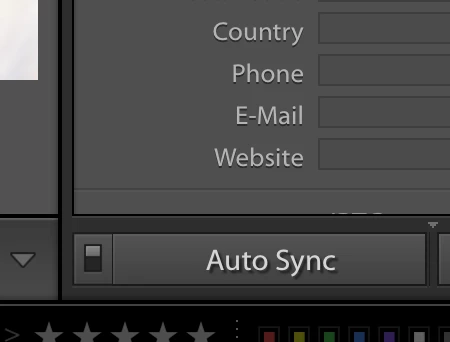
In Library module I used to be able to select 4-5 images, {using the box with the selected photos next to the X|Y box} and then I'd be able to X out the ones I didn't want. Now it rejects all of them. This happen to anyone else?

It was nice because I was able to look at 4 shots in a row and decide which ones were too similar or which ones stood out and then just click on the photo(s) I didn't want, X it out and then continue on.
This topic has been closed for replies.
Correct answer Bob Somrak

Make sure AutoSync in the right panel is OFF (your right panel is closed)

1 reply

Participant
June 26, 2017

So say I want to reject the 2nd photo. I'd click on that photo, press x and then now only the 4 would show up. 

Now when I press the x, they ALL get rejected.  It was not like this before?

Bob Somrak
Bob SomrakCorrect answer
Legend
June 26, 2017

Make sure AutoSync in the right panel is OFF (your right panel is closed)

M4 Pro Mac Mini. 48GB
Participant
June 27, 2017

Thank YOU!! Yes, that was it!!