


Participant
Sep 15, 2024 10:16 PM UTC
Question

Removal tool in Classic not giving me option to save, and doesn't

My Lightroom Classic after the 13.5.1 update now has it where when I use the removal tool or heal, it does the change but won't apply it or save. What the heck? Suggestion?? Why won't it work anymore? Thanks
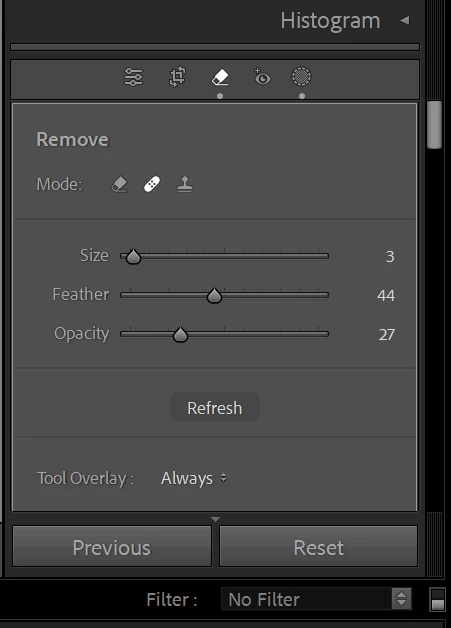
no save or apply button above

This topic is closed to new replies. Start a new post to keep the conversation going.

3 replies

JohanElzenga
Community Expert
Community Expert
Sep 16, 2024 11:12 AM UTC

You have chosen the older healing brush (brush looking like a band-aid), not the remove tool (which is the brush to the left, looking like an eraser). The healing brush does not have an 'Apply' button, because healing is applied as soon as you stop brushing. The reason why the tool does not perform as expected is because you have set the opacity to only 27%. Set it to 100% and try again. Also remember that you have to brush over the entire object. This brush does not have object recognition, so drawing a circle around the object does nothing.


Translate
-- Johan W. Elzenga
Participant
Sep 16, 2024 1:57 AM UTC

Thanks for the replies.  It does show the overlay, but then doesn't remove anything once I believe it's done. I click out of the tool after and doesn't save or do anything from my original. Before this update the old way worked. No idea why it goes through the motions then nothing changes at the end. Returns back to the same picture. 

Translate
GoldingD
Legend
Sep 16, 2024 1:20 AM UTC

So you click on the healing panel button, you select the healing option, then you click and drag on the image where you want the remove (heal) . Does no overlay show while you are doing that, and when you release the mouse button, nothing happens?


And no such thing as save in LrC.


Translate