Participant
May 25, 2025 12:12 AM UTC
Answered

Remove Tool

I'm using Lightroom Classic version 14.3.1. When I use the remove tool on multiple items, it works well on the first one, but not all the rest. I have to do them all individually, which takes a lot longer. Is this normal, or should I be able to do multiples at once? Thanks 

johnrellis
johnrellisCorrect answer
Legend
May 25, 2025 3:41 PM UTC

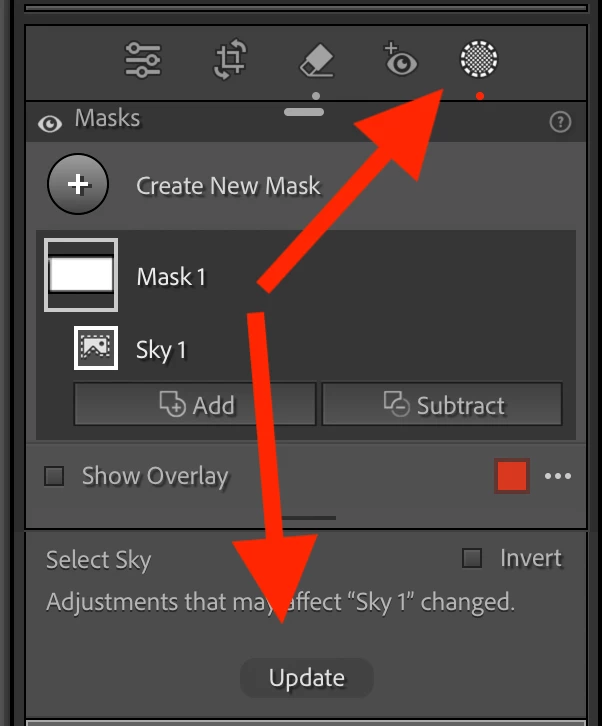
Do you have a sky mask applied to the sky? If so, did you notice that this mask needs to be updated after the remove tool is used (red dot below the mask icon) and did you update it accordingly?


PS. Please insert screenshots using this button, rather than attaching them.


[This post contains formatting and embedded images that don't appear in email. View the post in your Web browser.]


"and did you update it accordingly?"


Building on that, when you see the red dot under the Masking icon, click Update. Or do the menu command Settings > Update AI Settings:


8 replies

Participant
Sep 3, 2025 12:30 PM UTC

.....

Translate
johnrellis
Legend
May 25, 2025 1:17 AM UTC

Normally, when you make more than one disconnected selection with the Remove tool and then click Remove, it removes each one separately, as if you had done them one at a time. See the attached screen recording.  If you're observing something different, please post full-resolution screenshots or screen recordings (not phone pics or video) of what you do see:

https://www.lightroomqueen.com/community/help/createscreenshot/

https://www.descript.com/blog/article/how-to-screen-record-on-windows 
https://support.apple.com/guide/quicktime-player/record-your-screen-qtp97b08e666/mac 

Translate
DaveN777Author
Participant
May 25, 2025 9:19 AM UTC
Screenshot_2025-05-25_191428.png
Translate
JohanElzenga
Community Expert
Community Expert
May 25, 2025 9:25 AM UTC

Do you have a sky mask applied to the sky? If so, did you notice that this mask needs to be updated after the remove tool is used (red dot below the mask icon) and did you update it accordingly?


PS. Please insert screenshots using this button, rather than attaching them.


Translate
-- Johan W. Elzenga