
Known Participant
November 20, 2023
Answered

Rename tool does not honor mulitple digits

  • November 20, 2023
  • 1 reply
  • 257 views

LRC 13.0.1
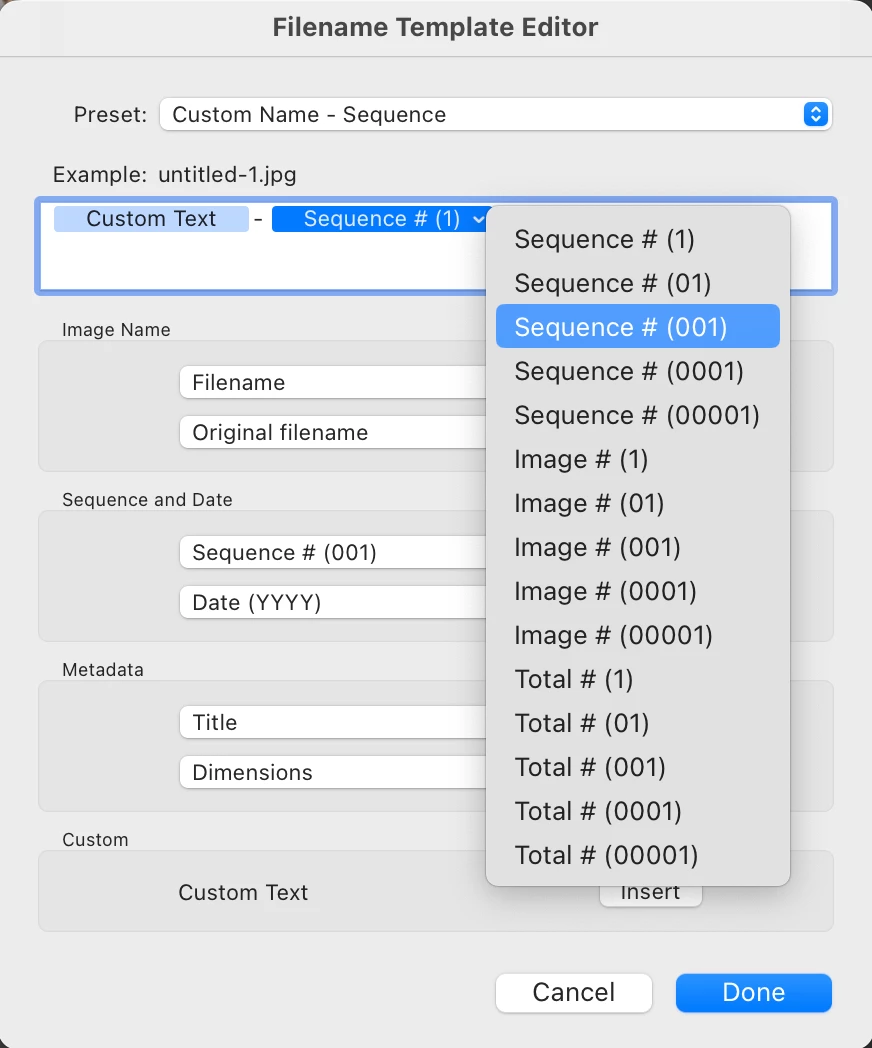
When I use Library -> Rename Photo ... The dialog pops up and I select Custom Name  - Sequence, I want to use mutliple digits so indicate 001 as the start. But it always reverts to a single digit 1. I could start at 1001 but that does not seem how it is supposed to, or should, work.
This topic has been closed for replies.
Correct answer Rikk Flohr_Photography

You need to edit the default settings of the Custom Name - Sequence to use Sequence # (001) instead of (1)

1 reply

Rikk Flohr_Photography
Community Manager
November 20, 2023

You need to edit the default settings of the Custom Name - Sequence to use Sequence # (001) instead of (1)

Rikk Flohr: Adobe Photography Org
Known Participant
November 21, 2023

Thanks for the quick reply. I  was using the Library -> Rename tool. I finally found the template editor from the instructions. https://helpx.adobe.com/lightroom-classic/help/filename-template-editor-text-template.html