Inspiring
March 4, 2021
Answered

Renaming folders in Lightroom Classic

  • March 4, 2021
  • 3 replies
  • 1141 views

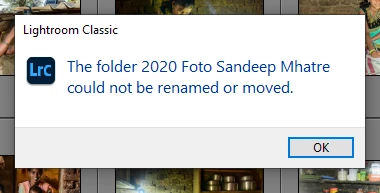
When will we able to rename folders in Lightroom Classic? I did once, will it ever be possible again ...?

This topic has been closed for replies.
Correct answer Benjamuna

Thank you for getting back to me. All of a sudden, the error disappeared and I was once again able to rename folders. Not sure why, but I guess these things happen!

3 replies

Known Participant
May 24, 2021

This is a brand-new problem for me. Saturday night I was able to rename all of my culled and edited images from my Saturday shoot. 


Saturday night I fiddled a bit in the Preferences because downloads were bringing in jpeg copies of images and dublicates.


Shot new images to a new folder in the same catalog on Sunday. After culling and editing Sunday's shoot I could not rename files. Well, I could rename two dng files that were created from Sunday images using the photomerge setting in LR. And the first handful (less than 10) Nikon RAW files renamed. But nothing after that. I traced back and all the permissions are set for Read & Right. The individual image files, the folders and even the external drive, all Read and Write. I'm stumped about where else to look for help. I know that I selected the entire set (271 images) every time.


I"m trying to rename in Library mode by going to Library>Rename files.


Thanks for your help.


FWIW, I get no error message. I simply select 270 files and the progress bar moves super fast as if it's renamed the whole set, but then when I look only those dng photomerge files are renamed, not the entire set of 270 images.


iMac using 


Known Participant
May 24, 2021

Here's my computer info:  About half of my drive is available.

JohanElzenga
Community Expert
Community Expert
March 4, 2021

This is an error that is probably caused by a permissions problem. It is still possible to rename folders in Lightroom Classic, but the OS may not permit it. That is what you see here.


-- Johan W. Elzenga
BenjamunaAuthorCorrect answer
Inspiring
March 17, 2021

Thank you for getting back to me. All of a sudden, the error disappeared and I was once again able to rename folders. Not sure why, but I guess these things happen!

DdeGannes
Community Expert
Community Expert
March 4, 2021

Welcome to the forum. Please see the screen capture which shows what info is expected when you create a thread.

The only thing I can think of is that Lightroom does not have permission to access the folders.


Regards, Denis: iMac 27” mid-2015, macOS 11.7.10 Big Sur; 2TB SSD, 24 GB Ram, GPU 2 GB; LrC 12.5,; Lr 6.5, PS 24.7,; ACR 15.5,; (also Laptop Win 11, ver 24H2, LrC 15.0.1, PS 27.0; ) Camera Oly OM-D E-M1.