Answered
resize
Trying to resize an image. I'm trying for a .. 1920x1080 image and I keep getting a .. 1620x1080 image after clicking "Resize to Fit" box and setting parameters.
Windows 11
LrC version 14.3.1

Trying to resize an image. I'm trying for a .. 1920x1080 image and I keep getting a .. 1620x1080 image after clicking "Resize to Fit" box and setting parameters.
Windows 11
LrC version 14.3.1
OK, then the animation below should help explain exactly what is going on, it’s a different way of showing what Rob_Cullen already illustrated. As ExUSA said, 6960 x 4640 px works out to a common 3:2 aspect ratio digital camera sensor frame, while the 1920 x 1080 px dimensions you’re exporting to is a different 16:9 aspect ratio frame commonly used by HDTV.
So, as we’ve all been saying, your starting and ending frames have different width-to-height proportions, so to get from 6960 x 4640 px to 1920 x 1080 px you have to resolve the difference in proportions. The export feature in just about all photo apps you’ll ever find (Adobe and non-Adobe) scales proportionally, so it will preserve your image’s 3:2 proportion within the 16:9 frame you’re asking for, as shown in the demo below.
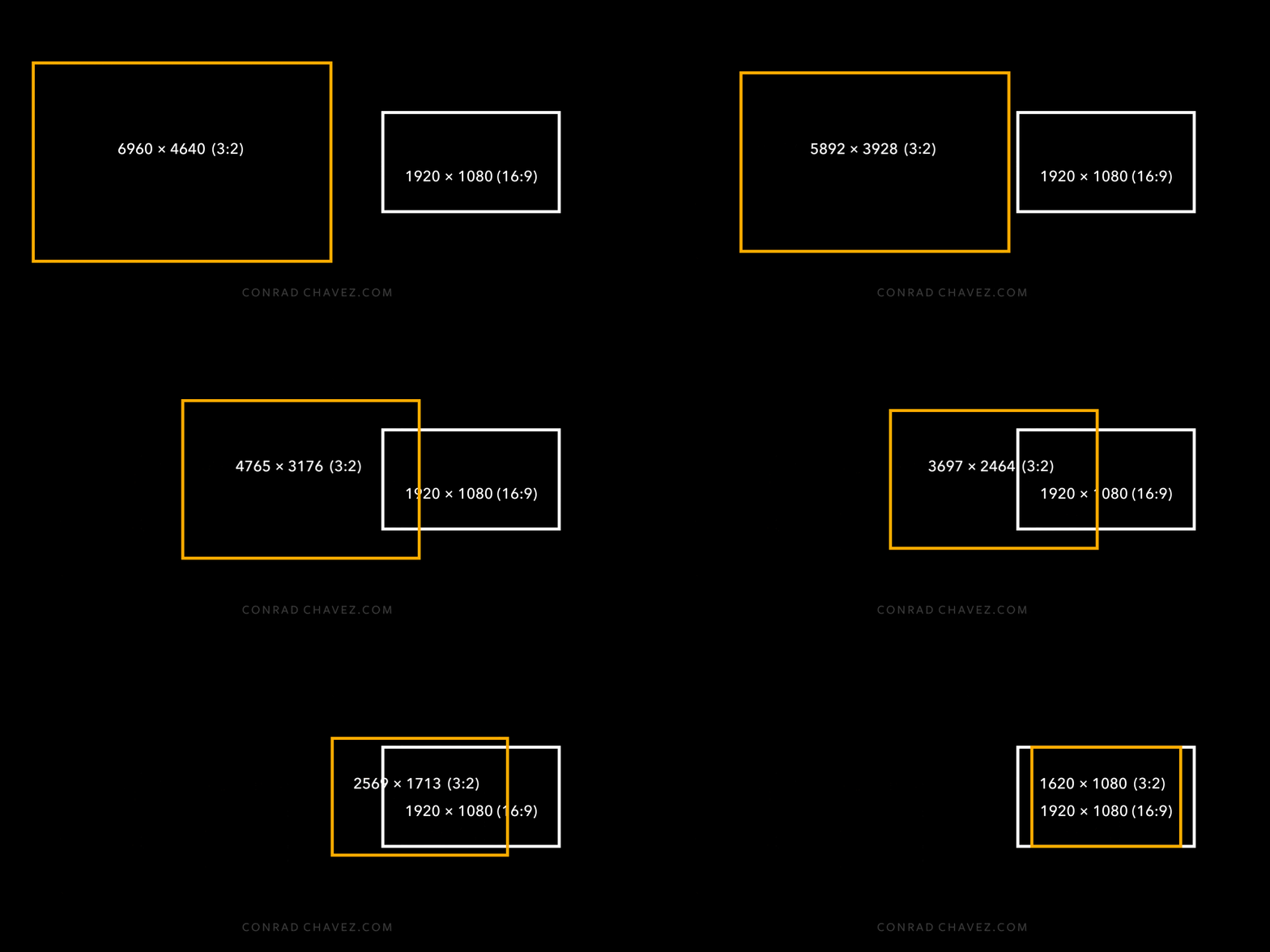
If you don’t want that result, you crop the image to 16:9 before exporting so that you can decide how to trim off the top and bottom so that the 3:2 picture fills the 16:9 final dimensions. The only other option is to distort the image non-proportionally to stretch the 3:2 image to fit 16:9, but the distortion looks bad so no one does that; if you did want that uncommon “stretch” solution it would have to be done in another photo editor such as Photoshop.
Again, this is how image scaling works in general. It isn’t specific to Lightroom Classic, it would happen with any software. And, by the way, this is also how it must work if you aren’t even using a computer: If you were in a photo darkroom in the year 1964 with a 35mm (3:2) film negative, and you wanted to print an enlargement on the standard paper size of 10 x 8 inches (5:4), you would have to crop out the ends of the 3:2 aspect ratio original in the darkroom enlarger to fill that 5:4 aspect ratio print.
Already have an account? Login
No account yet? Create an account
Enter your E-mail address. We'll send you an e-mail with instructions to reset your password.


 AdChoices