Participant
August 24, 2017
Answered

Resizing above the native pixel count..

  • August 24, 2017
  • 2 replies
  • 857 views

Technical question. If i export an image from lightroom using the resizing option choosing a pixel count HIGHER than the native original, whats happening ? interpolation ? aside from the increase in file size i cant see any physical difference or deterioration. Thanks

This topic has been closed for replies.
Correct answer Abambo

Sizing-up may be necessary to combine pictures of different sizes.And I use upsizing regularly to keep control over the print quality when I need to print a picture at a bigger size than designed. I use Photoshop for this. Formerly, I needed to use some tricks to get a better result but since Photoshop CC 2016(?), Adobe modified the algorithm and it produces a very good result.

Changing the size of a pixel picture (compared to a vector picture) is always a question of interpolation, as pixels need to be added or take away in the case of a downsize.

The hard work in upsizing is to keep details.

Example:

Original image (5x5cm@72dpi):

Up-sized (using PhotoShop CS6, default settings, left) and just for the fun of it, the same image with PS CC 2017 (right):
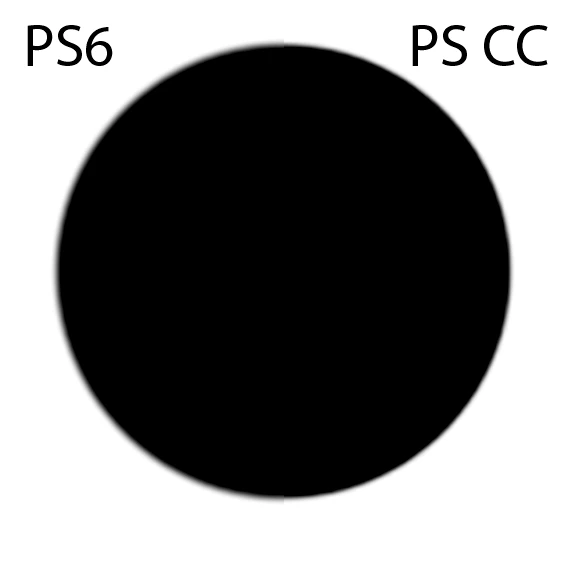
You see the interpolation and the difference in the work done by the older vs the newer version. This example is also synthetic. A real world photograph will show much less blurring, especially if you sharpen the image for the final output use.

It starts to get critical when you have pictures with strong (compression) artefacts in. Those get also interpolated and at some point, you will see them.

2 replies

dj_paige
Legend
August 24, 2017

How are you looking at this expanded image? I think to see any difference between it and the original, you'd need to view it at 100% zoom both original and expanded.

Although, I wonder what the point is, of course there is some degradation when you expand the image.

JP Hess
Inspiring
August 24, 2017

Of course Lightroom is using interpolation. Pixels must be created to fill in the area. I'm sure the larger you go the more deterioration you will see. Nothing is perfect.

Participant
August 24, 2017

granted and i understand the practice but never use it because apart from being unnecessary i certainly dont want to degrade my image. I always believed i would see a quality drop with small amounts of interpolation which is why this has thrown me

Abambo
Community Expert
AbamboCommunity ExpertCorrect answer
Community Expert
August 24, 2017

Sizing-up may be necessary to combine pictures of different sizes.And I use upsizing regularly to keep control over the print quality when I need to print a picture at a bigger size than designed. I use Photoshop for this. Formerly, I needed to use some tricks to get a better result but since Photoshop CC 2016(?), Adobe modified the algorithm and it produces a very good result.

Changing the size of a pixel picture (compared to a vector picture) is always a question of interpolation, as pixels need to be added or take away in the case of a downsize.

The hard work in upsizing is to keep details.

Example:

Original image (5x5cm@72dpi):

Up-sized (using PhotoShop CS6, default settings, left) and just for the fun of it, the same image with PS CC 2017 (right):

You see the interpolation and the difference in the work done by the older vs the newer version. This example is also synthetic. A real world photograph will show much less blurring, especially if you sharpen the image for the final output use.

It starts to get critical when you have pictures with strong (compression) artefacts in. Those get also interpolated and at some point, you will see them.

ABAMBO | Hard- and Software Engineer | Photographer