
RinJERKS
Participant
March 26, 2025
Question

Resolution Enhancement Tool in Lightroom Classic

  • March 26, 2025
  • 2 replies
  • 152 views

Hello.  I'm having a problem with the resolution enhancment tool in Lightroom Classic.  I get a large ring of light after enhancing my image. The original file is a Nikon RAW file (.NEF) and I'm using a fairly recent Macbook Pro (2022) laptop.  While HDR data is available in the RAW file and my computer is capable of displaying HDR content, the same ring appears whether I've enabled HDR or not.  I still have the original file, but I'd really like to print this one larger.  Any help is appreciated.  Thanks!  -Rick W.
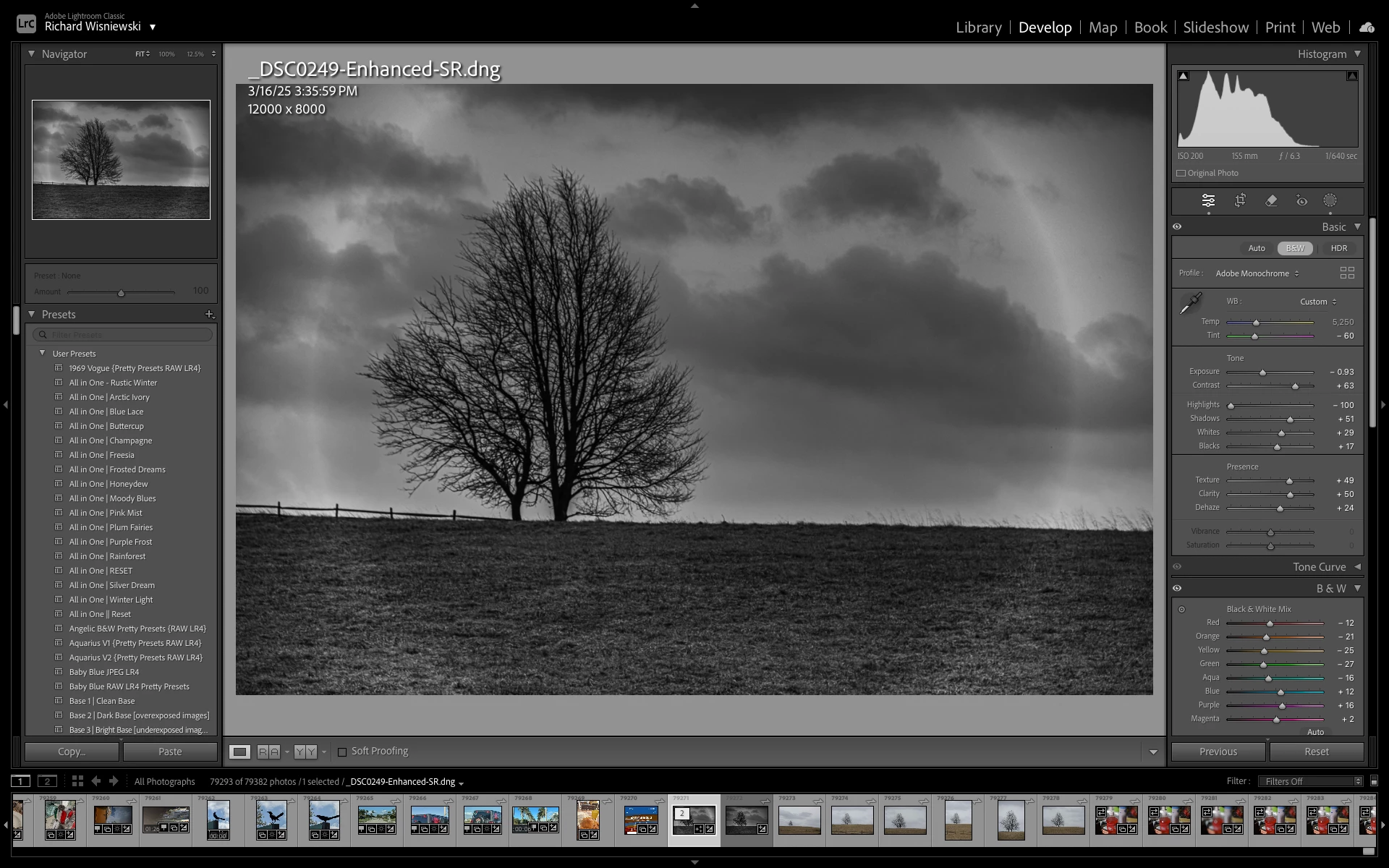
2 replies

Rikk Flohr_Photography
Community Manager
March 27, 2025

Does toggling on/off the Lens Profile Correction (or taking the Distortion Slider to Zero) affect the appearance of the circular artifact?


Rikk Flohr: Adobe Photography Org
GoldingD
Legend
March 26, 2025

I am noticing two things, perhaps leading to an incorrect assumption, perhaps being viewed incorrectly by me.


  1. Your selected image is in a stack, apparently a collapsed stack. And I wonder about the original source image that is probably within the stack. (not at a computer to experiment on or remind me how stacks appear, could that image right next to the selected one be the source image?)
  2. Lots of double arrows in the filmstrip thumbnail badges, indicating cloud (mobile??)  sync. Are you editing an original, or perhaps a degraded copy brought over via s sync from the cloud? If you had an actual SOC on your local hard drive, and imported into LrC, does that edit differently?


An additional inquiry after some rethought


  1. I notice that you have applied a mask, some local edits, Were those pre Enhance and brought over in the process?
  2. I notice, as mentioned, the not selected similar image just to the right in the filmstrip. Was that the source, and as for the B&W treatment edits shown in that filmstrip  preview accomplished before the enhance?
  3. Generally, it is recommended to not make edits pre enhance, it might lead to issues or at least wasted effort.


RinJERKS
RinJERKSAuthor
Participant
March 27, 2025

Thanks for responding.  I had importd the photos from the memory card onto Lightroom Mobile on the iPad Pro.  When I tried to enhance the resolution, I got that ring that you saw.  This morning, I imported the photos directly from the memory card onto the MacBook Pro.  When I tried to enhance after the edit, I got the same problem.  I was unable to copy the settings of the standard resolution edit without getting that ring, so I wrote down all the settings, enhanced the RAW camera image and typed in all the values for the edit, including the mask. This yeilded no ring and I was even able to turn on HDR without a problem.  Thanks!!