silsurf@me.com
Inspiring
March 13, 2018
Answered

Retain date on import of older images?

  • March 13, 2018
  • 1 reply
  • 462 views

I am trying to import images from 2012 and have them placed into folder derived from the creation dates.

When I select the images, the select a sub folder of 2012 on my destination disk, the result are:

2012->2018/Mar

I would like it to be:

2012->"date from the existing photo"

Hope this makes sense, thanks for any help.

Henry
This topic has been closed for replies.
Correct answer AxelMatt

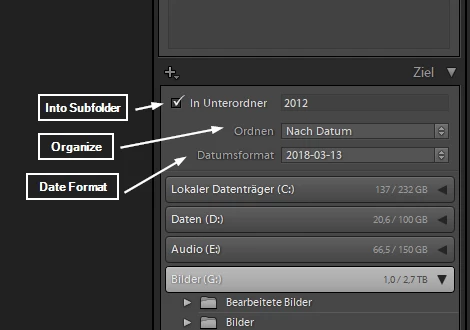
In the import dialog you have to set first the location where you like to save your pictures. The mark "Into Subfolder" and enter 2012. Choose "By Date" ("Nach Datum" in German) by the "Organize" option and choose the appropriate date format.

See the screenshot below (its from a German Lightroom). This settings should be work as you wish.

1 reply

AxelMattCommunity ExpertCorrect answer
Community Expert
March 13, 2018

In the import dialog you have to set first the location where you like to save your pictures. The mark "Into Subfolder" and enter 2012. Choose "By Date" ("Nach Datum" in German) by the "Organize" option and choose the appropriate date format.

See the screenshot below (its from a German Lightroom). This settings should be work as you wish.

My System: Intel i7-8700K - 64GB RAM - NVidia Geforce RTX 3060 - Windows 11 Pro 25H2 -- LR-Classic 15 - Photoshop 27 - Nik Collection 9 - PureRAW 6 - Topaz Photo AI
JohanElzenga
Community Expert
Community Expert
March 13, 2018

If the subfolder '2012' already exists (and if I understand it correctly it does indeed), then you can just select that subfolder. Then don't check the option to create another subfolder, just select Order: By Date and Date format: <the format you wish to use>.

-- Johan W. Elzenga
silsurf@me.com
Inspiring
March 13, 2018

Thanks