


Inspiring
August 10, 2026
Question

Reviving a catalog

  • August 10, 2026
  • 7 replies
  • 46 views

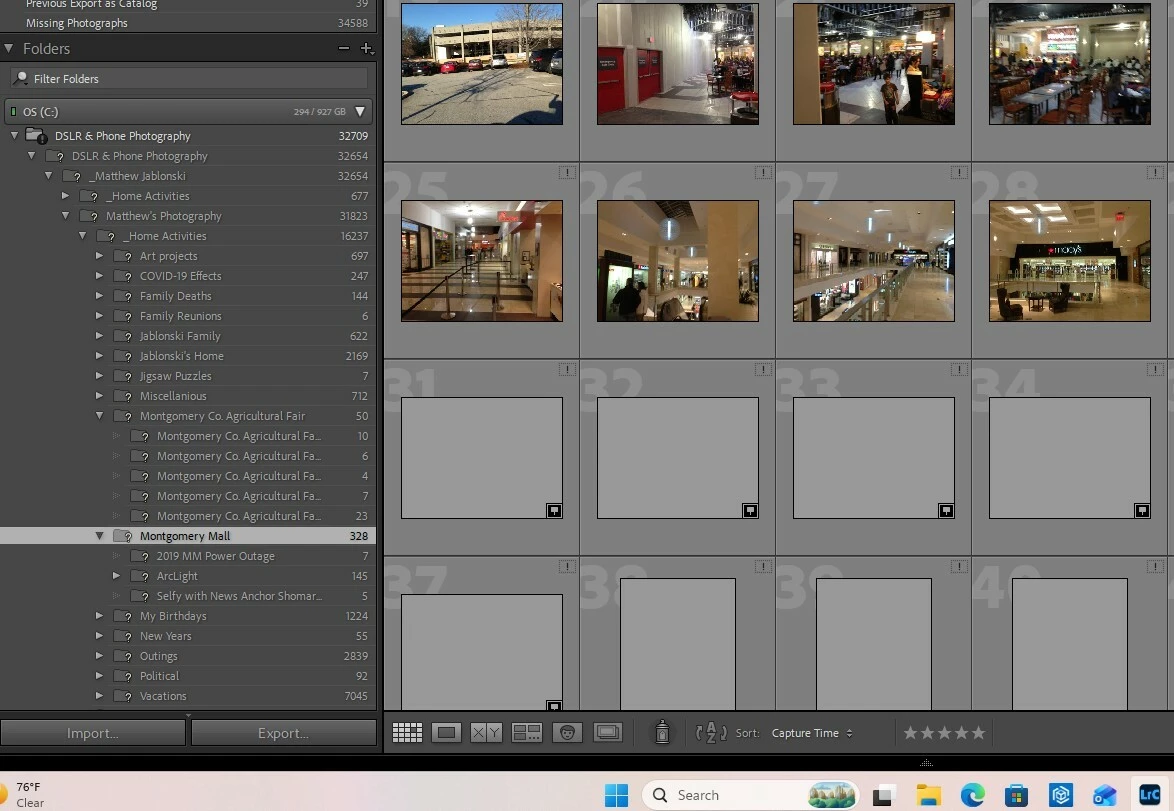
In wake of a power outage, when I reopened LrC, ALL of my images had been moved to a new location. Some of which remained intact as thumbnails and others completely missing. Is there any way to revive the current catalog? If so, how?


Matthew
 

    7 replies

    Inspiring
    August 10, 2026

    Got it - (I think). That’s an excellent question.

    If I find the folder, move ALL of the second “DSLR & Phone Photography” folder to the first one (outside of LrC), should I import it again? Or would that just confuse LrC even more?

    Matthew

    dj_paige
    Legend
    August 10, 2026

    No one has suggested moving photos, and definitely not a good idea. No one has suggested importing photos/folders again, and definitely not a good idea. What has been suggested is restoring a recent backup of your catalog file; definitely a good idea. Please try that.

    Inspiring
    August 10, 2026

    No. Nor do I think I may have accidentally “REsyncronized” the catalog. However, I do have easy access to their SD cards. The images I can view, they are very consistent with your reading. What troubles me the most is that I can still view (in some form) SOME of them but not others. It seems like whatever occurred would have caused ALL of the images to completely fail. Am I wrong?

    Matthew


    Inspiring
    August 10, 2026

    >It that really how your folder hierarchy was, or did that second “DSLR & Phone Photography” folder never exist?

    Yes. Photography is secondary to my main interest, digital illustration. So, I manage a NON-LrC folder for all of those projects, which include a hand full of photographic images, that is outside  LrC.

    Matthew

    JohanElzenga
    Community Expert
    Community Expert
    August 10, 2026

    I don’t think you understood my question; I certainly do not understand your answer. What I asked was the following. You screenshot shows that Lightroom Classic expects a folder called “DSLR & Phone Photography” and inside that folder it expects a subfolder that is also called “DSLR & Phone Photography”. However, while it can find the first “DSLR & Phone Photography” folder, it can not find that subfolder. That makes me wonder if you really ever had these two folders with the same name, or that the power outage perhaps created a ‘ghost subfolder’ in the catalog, that never existed on disk.

    -- Johan W. Elzenga
    JohanElzenga
    Community Expert
    Community Expert
    August 10, 2026

    It’s very unlikely that a power outage could relocate all your images. It’s more likely that the power outage damaged your catalog, so the path to the top image folder in that catalog got scrambled up.

    I notice in your screenshot that Lightroom still knows the location of the top “DSLR & Phone Photography” folder, but that it expects a subfolder with exactly the same name inside that top folder. That subfolder is not there in reality however, hence it’s shown as missing and so are all the subfolders inside it. It that really how your folder hierarchy was, or did that second “DSLR & Phone Photography” folder never exist?

    Replacing your catalog with a backup copy might be the best way to solve this, because you don’t know what else might be corrupted. Otherwise it should indeed be rather simply to ‘relink’ that first missing subfolder, which will relink the entire folder hierarchy.

    -- Johan W. Elzenga
    Rob_Cullen
    Community Expert
    Community Expert
    August 10, 2026

    Based on what I see in your screen-clip,  The catalog has ‘lost’ all your images. Every folder , sub-folder (with a ?) and image (with a !) is shown as ‘Missing’.

    Do YOU know where this parent folder {DSLR & Phone Photography} is located if you search with Windows File Explorer?

    When you find it you can re-link LrC to its correct location in Lr-Classic by a [Right-Click] on that folder in LrC folder panel and choose [Find Missing Folder...]- direct file explorer to the location YOU know it to be.

    MISSING FILES & FOLDERS (Lightroom Queen)

    Do not try to import photos or synchronize folders.


    Regards. My System: Windows-11, Lightroom-Classic 15.4.1, Photoshop 27.8, ACR 18.4, Lightroom 9.4, Lr-iOS 10.4.0, Bridge 16.0.3 .